WordPress.org

Svenska

  • Teman
  • Tillägg
  • Nytt
  • Support
  • Om…
  • Mönster
  • Engagera dig!
  • Skaffa WordPress
Skaffa WordPress
WordPress.org

Plugin Directory

WP Edit Username

  • Skicka in ett tillägg
  • Mina favoriter
  • Logga in
  • Skicka in ett tillägg
  • Mina favoriter
  • Logga in

WP Edit Username

Av Sajjad Hossain Sagor
Ladda ner
Förhandsgranskning live
  • Detaljer
  • Recensioner
  • Installation
  • Utveckling
Support

Beskrivning

This plugin adds feature to edit/change user username.

Features:

  • Edit Username: Allows editing of usernames.
  • Only users with the edit_other_users() capability can change usernames.
  • If the “Send Email” option is enabled, the user will receive a notification email when their username is changed.
  • You can customize the email subject and body text in the admin dashboard or via filter hooks.
  • Modify the email subject using the filter: wpeu_email_subject.
  • Modify the email headers using the filter: wpeu_email_headers.
  • Adjust the email body content using the filter wpeu_email_body. (Note: $new_username and $old_username are automatically prepended to the email content).

Hooks Usage:

<?php

add_filter( 'wp_username_changed_email_subject', 'change_email_subject' );

function change_email_subject( $subject )
{
    $subject = 'Your customized subject';

    return $subject;
}

add_filter( 'wp_username_changed_email_body', 'change_email_body' );

function change_email_body( $old_username, $new_username )
{
    $email_body = "Your custom email text body.";

    return $email_body;
}

?>

Skärmdumpar

  • Settings panel for WP Edit Username plugin.
  • Username Edit Button.
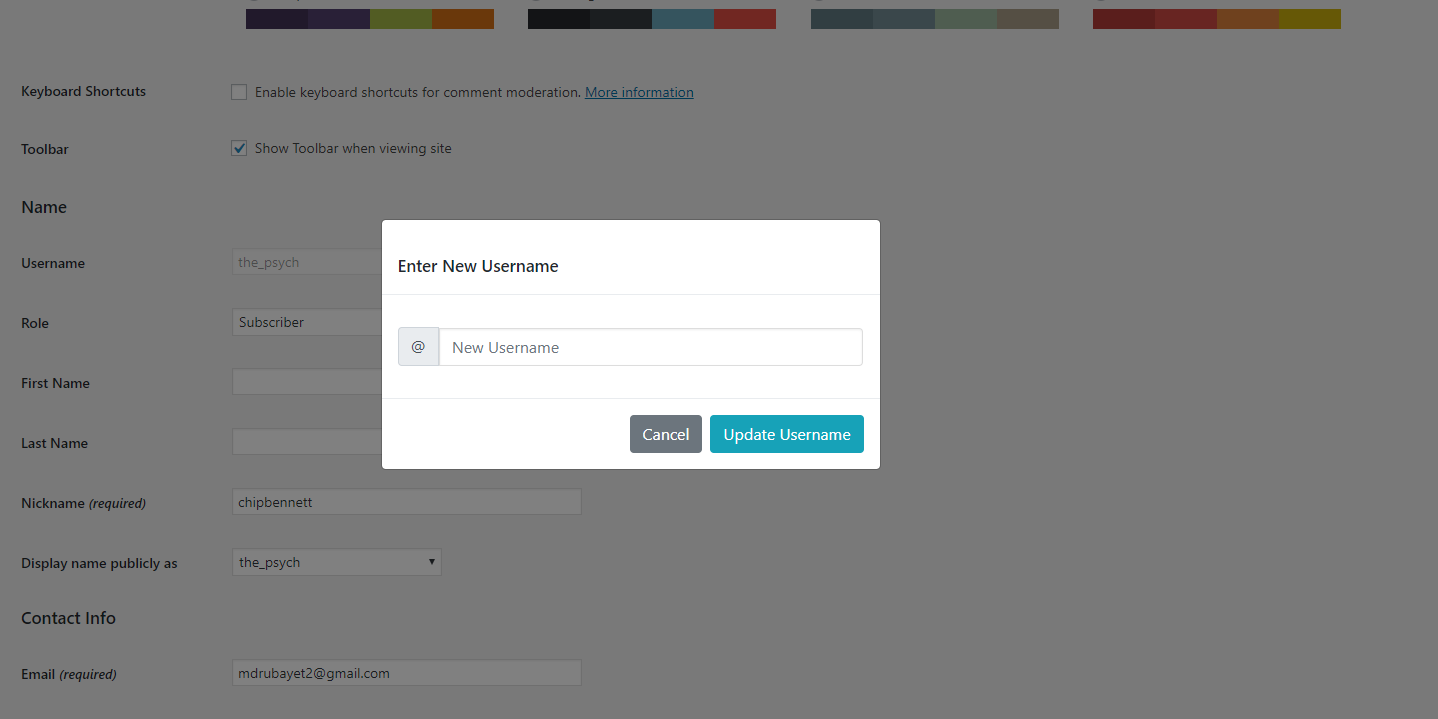
  • New Username Input Field.
  • After Username Changed Message.

Installation

To add a WordPress Plugin using the built-in plugin installer:

Go to Plugins > Add New.

  1. Type in the name ”WP Edit Username” in Search Plugins box
  2. Find the ”WP Edit Username” Plugin to install.
  3. Click Install Now to begin the plugin installation.
  4. The resulting installation screen will list the installation as successful or note any problems during the install.
    If successful, click Activate Plugin to activate it, or Return to Plugin Installer for further actions.

To add a WordPress Plugin from GitHub repo / plugin zip file :
1. Go to WordPress plugin page
2. Click Add New & Upload Plugin
3. Drag / Click upload the plugin zip file
4. The resulting installation screen will list the installation as successful or note any problems during the install.
If successful, click Activate Plugin to activate it, or Return to Plugin Installer for further actions.

Vanliga frågor

How to use this plugin?

Just after installing WP Edit Username plugin, Go to user profile and edit user username by clicking Edit button.

Update inputs according to your requirement and you are good to go.

Recensioner

gets the job done

ahmedalaa01v 5 september 2024
gets the job done

does its job 😉

default-design 29 augusti 2023
does its job 😉

Easy, quick! PLEASE UPDATE FOR CURRENT WP VERSION

gpworx 14 december 2022
THANK YOU!!! Using this plugin with ProfileGrid and could not change user names — even from phpMyAdmin. This plugin does the job AND offers to send an email to the user and admin about the change. Awesome! Please update this plugin for security with the latest version of Wordpress. Thank you again!

Good

Tanjimul Islam 30 april 2018
Nice effort…Well done! We want more.

nice WP Edit Username

parvezpreo 29 april 2018
good working .. Awesome plugin. #LOVE it
Läs alla 5 betyg

Bidragsgivare och utvecklare

”WP Edit Username” är programvara med öppen källkod. Följande personer har bidragit till detta tillägg.

Bidragande personer
  • Sajjad Hossain Sagor

”WP Edit Username” har översatts till 1 språk. Tack till översättarna för deras bidrag.

Översätt ”WP Edit Username” till ditt språk.

Intresserad av programutveckling?

Läs programkoden, kika på SVN-filförvaret eller prenumerera på utvecklarloggen via RSS.

Ändringslogg

2.0.4

  • Fixed issue: typo giving fatal error

2.0.3

  • Applied security patch and added more html tags to the allowed html list

2.0.2

  • Checked for latest wp version 6.8

2.0.1

  • Minor changes in codebase only.

2.0.0

  • Major changes in codebase. Compatibility checkup for latest wp version 6.7, updated bootstrap to latest, removed unused css and added confirmation before submitting username change form.

1.0.8

  • Updated button type from default ’submit’ to ’button’

1.0.7

  • Checked for latest wp version 6.6

1.0.6

  • Fixed Plugin settings XSS vulnerability.

1.0.5

  • Added additional email sender : User Only. Added bunch of shortcodes to use in the subject and email body.

1.0.4

  • Checked for latest wp version 6.3

1.0.3

  • Checked for latest wp version & updated coding styles… major changes nothing

1.0.2

  • Checked for latest wp version & updated coding styles… major changes nothing

1.0.1

  • Checked for latest wp version & updated coding styles… major changes nothing

1.0.0

  • Initial release.

Meta

  • Version 2.0.4
  • Senast uppdaterat 4 månader sedan
  • Aktiva installationer 2 000+
  • WordPress-version 5.6 eller senare
  • Testat upp till 6.8.3
  • PHP-version 8.0 eller senare
  • Språk

    Chinese (Taiwan) och English (US).

    Översätt till ditt språk

  • Etiketter
    ajaxChange Usernameprofile-edituser profileusername
  • Avancerad vy

Betyg

5 av 5 stjärnor.
  • 5 5-stjärniga recensioner 5 stjärnor 5
  • 0 4-stjärniga recensioner 4 stjärnor 0
  • 0 3-stjärniga recensioner 3 stjärnor 0
  • 0 2-stjärniga recensioner 2 stjärnor 0
  • 0 1-stjärniga recensioner 1 stjärna 0

Lägg till min recension

Se alla recensioner

Bidragande personer

  • Sajjad Hossain Sagor

Support

Har du något att säga? Behöver du hjälp?

Visa supportforum

  • Om
  • Nyheter
  • Webbhotell (hosting)
  • Integritet
  • Showcase
  • Teman
  • Tillägg
  • Mönster
  • Lär dig
  • Support
  • Utvecklare
  • WordPress.tv ↗
  • Engagera dig
  • Evenemang
  • Donera ↗
  • Five for the Future
  • WordPress.com ↗
  • Matt ↗
  • bbPress ↗
  • BuddyPress ↗
WordPress.org
WordPress.org

Svenska

  • Besök vår X-konto (f.d. Twitter)
  • Besök vårt Bluesky-konto
  • Besök vårt Mastodon-konto
  • Besök vårt Thread-konto
  • Besök vår Facebook-sida
  • Besök vårt Instagram-konto
  • Besök vårt LinkedIn-konto
  • Besök vårt TikTok-konto
  • Besök vår YouTube-kanal
  • Besök vårt Tumblr-konto
Kod är poesi.