

Beskrivning
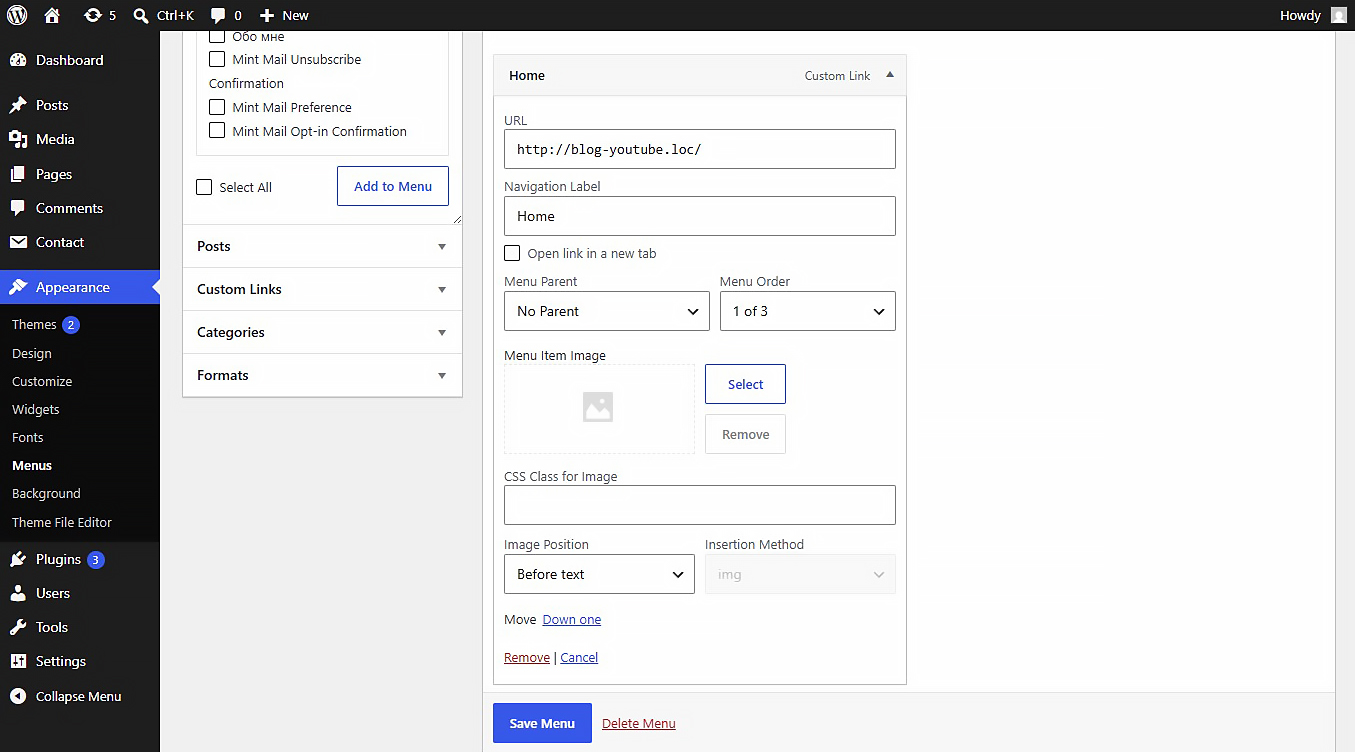
This plugin allows you to upload or link images (JPEG, PNG, WebP, SVG, etc.) directly inside the WordPress Customizer or Appearance > Menus panel. Includes built-in SVG sanitization for secure inline SVG injection.
Settings
After activating the plugin, navigate to Settings Media in your WordPress admin dashboard. There you will find the ”NaviPix Settings” section where you can disable SVG upload support and SVG sanitization if needed. This gives you full control over whether the plugin handles SVG files or leaves them to your theme or other plugins.
Skärmdumpar
Installation
- Upload the plugin folder to the
/wp-content/plugins/directory. - Activate the plugin through the ’Plugins’ menu in WordPress.
- Go to Appearance > Menus, open any menu item, and choose your image.
Recensioner
Detta tillägg har inga recensioner.
Bidragsgivare och utvecklare
”NaviPix” är programvara med öppen källkod. Följande personer har bidragit till detta tillägg.
Bidragande personer
”NaviPix” har översatts till 1 språk. Tack till översättarna för deras bidrag.
Översätt ”NaviPix” till ditt språk.
Intresserad av programutveckling?
Läs programkoden, kika på SVN-filförvaret eller prenumerera på utvecklarloggen via RSS.
Ändringslogg
1.0.0
- Initial release.