

Beskrivning
Activity Track – User Activity Log – Record supported WordPress activity and investigate account, content, and store changes. Optional Pro features add AI log explanations and additional investigation tools.
It combines real-time activity tracking, AI-driven analysis, and customizable notifications to help you quickly investigate issues, monitor security, and understand what users do on your site.
What This Plugin Logs (at a glance)
- User logins & logouts (success and failed attempts)
- Post/page changes (create, update, delete, status changes)
- Plugin & theme actions (activate, deactivate, install, update)
- User & role changes (add, remove, capability/role updates)
- Media & downloads (uploads, deletions)
- Settings changes (options updated)
- WooCommerce orders (new orders, status changes, refunds, trashed and deleted orders)
Who It’s For
- Agencies managing multiple client sites
- Security teams monitoring user actions
- Content teams needing transparency and accountability
- Site owners who want visibility into their site’s health
Why Choose This Activity Log Plugin
- Accurate audit trail: designed for admins who need trustworthy logs.
- Fast & lightweight: minimal overhead; indexed tables keep queries quick.
- Actionable alerts: email/Slack rules so you know about critical events instantly.
- Privacy controls: IP anonymization and hashing options (Pro) for GDPR/CCPA.
Core Features (Free)
-
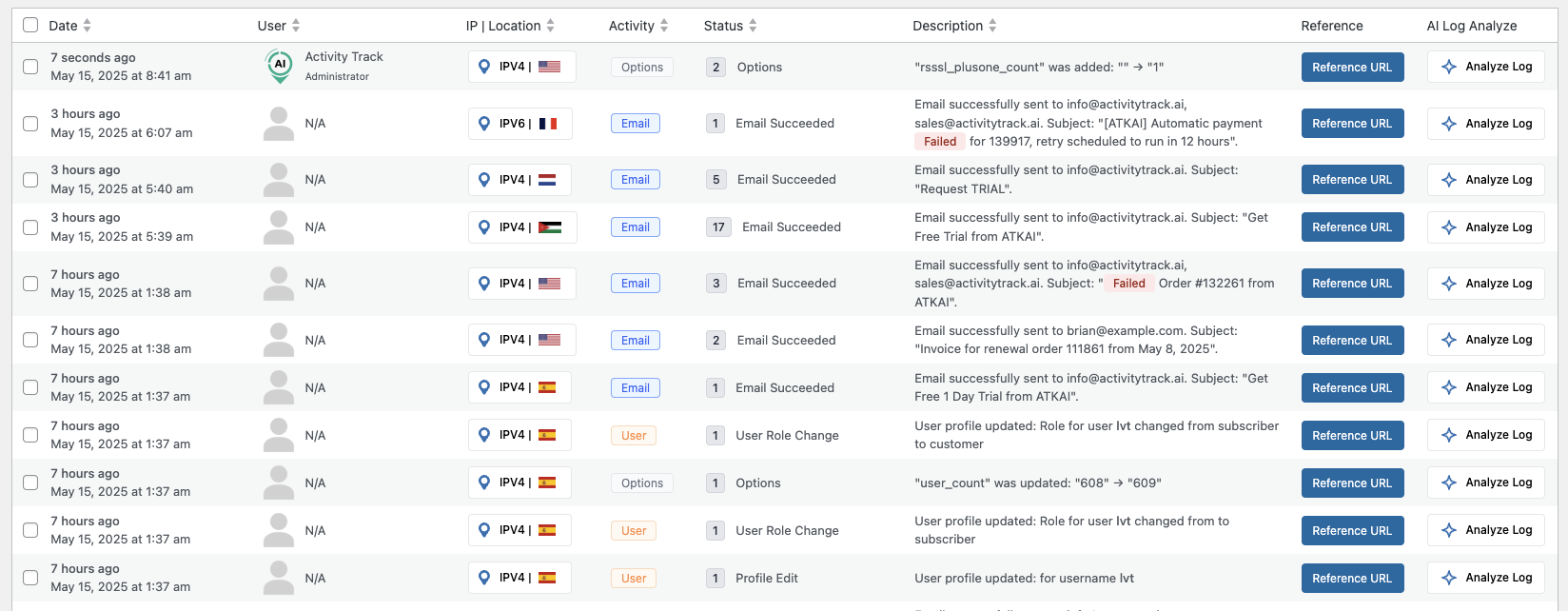
🔍 Real-Time Activity Logging
Capture every key event (logins, content edits, downloads, failed attempts, etc.) as it happens. -
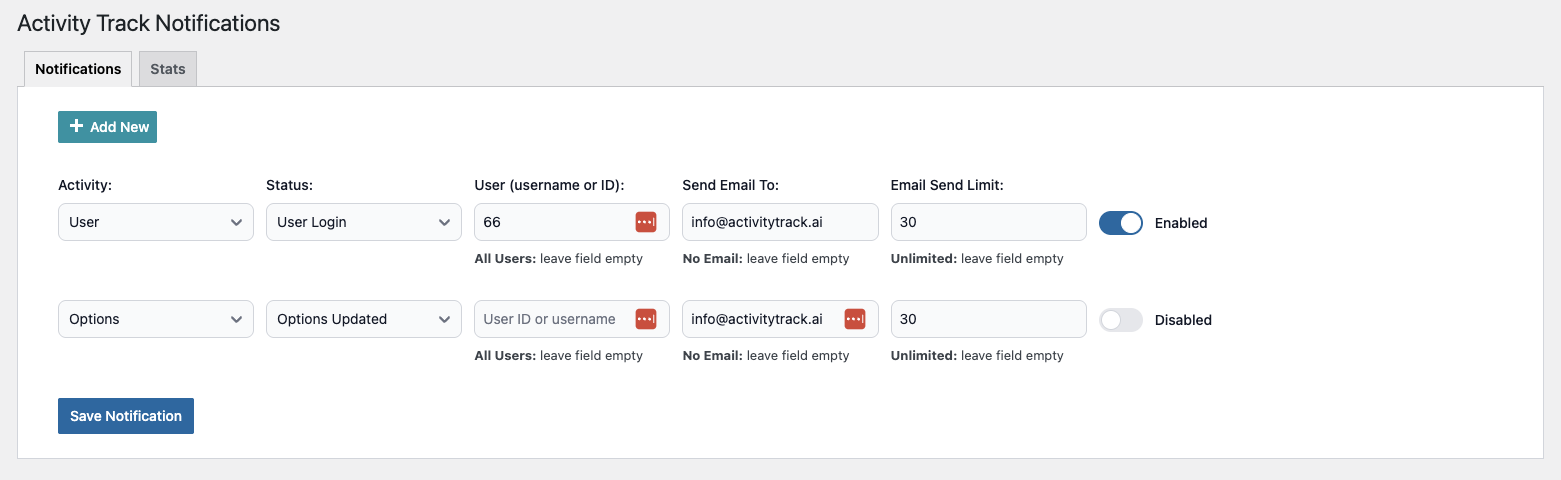
🔔 Custom Notifications
Trigger alerts based on user roles, specific actions, IP ranges or threshold events via email or Slack. -
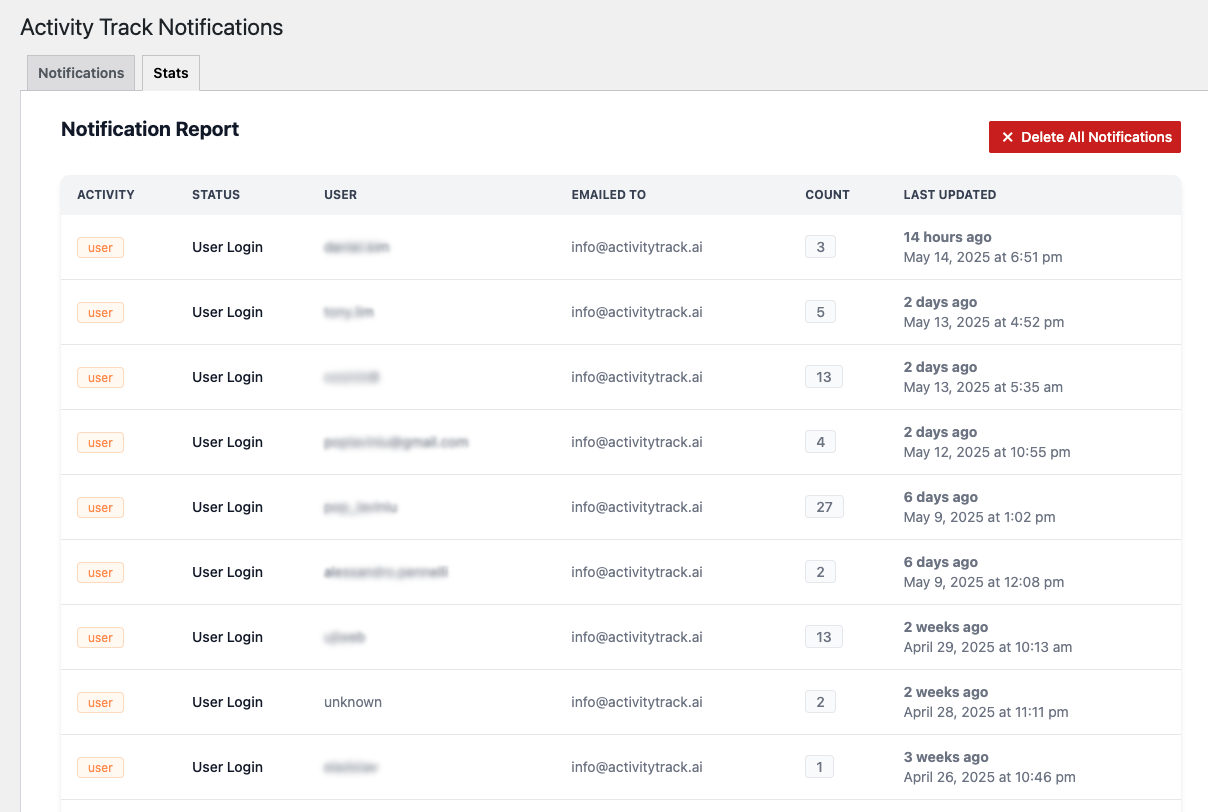
📊 Reports & Statistics
View detailed dashboards and exportable reports on activity trends, top users, and security events. -
🔒 Multisite Compatible
Single-site or network-wide deployment—centralized control for multisite installs. -
📥 CSV Export
Download detailed activity reports for compliance, audit or sharing.
GET SUPPORT AND PRO FEATURES
Get professional support and more features with Activity Track PRO
WooCommerce Activity (Free)
Connect recorded account activity, checkout submissions, saved payment methods, and payment outcomes in one timeline. Includes customer/order summaries, grouped profile updates, outcome badges, and links to related timelines.
- Enable WooCommerce under Activity Track Settings Enable Activity Types to show the WooCommerce Activity menu. Enable User to record registration, sign-ins, and profile changes.
- Supported Stripe events are collected through the WooCommerce Stripe gateway. Live webhook recording is shown separately from WooCommerce payment completion; an unconfirmed webhook does not mean a payment failed.
- Review notices highlight five or more recorded live Stripe payment/card-setup failures for the same linked user within ten minutes. Failures can be legitimate retries and do not prove fraud.
- Profile changes store allowlisted categories, not field values. Older events may not contain changed-field details.
- Summaries cover the events on the current page. Tracking starts when enabled; missing records do not prove no activity occurred.
- Monitoring only: this feature does not block customers, validate cards, or replace WooCommerce order management or payment-provider fraud controls. No raw card details or payment payloads are stored by this recorder.
Free works independently. Pro is optional and requires the Free plugin to remain installed and active.
404 Errors (Free)
Review final front-end 404 responses in Activity Track 404 Errors, with requested URLs, referrers, device information, and recorded visitor details.
- Tracking is enabled by default. Turn it off under Activity Track Settings Enable 404 tracking.
- Search recorded URLs, filter by date, export CSV, and delete selected records.
- URL query values are redacted. Capture does not perform remote location lookups and respects the IP logging setting.
- Recording is limited to 60 per minute and 5,000 per day. At 10,000 stored records, the oldest 1,000 are deleted in a batch before adding more. Age-based retention still applies (30 days by default).
- Pause or resume recording directly on the 404 page. Existing records remain accessible while paused; automatic retention cleanup continues. Recording status shows active, paused, or capture-limit states. Skipped responses are not backfilled.
- Bot labels use User-Agent automation signals. Unrecognized clients probing PHP files in common scanner targets are labeled Suspected bot. Labels apply to existing records and CSV exports; they do not verify identity or block requests.
- Monitoring only: this feature does not redirect URLs or block requests. Earlier 404 responses are not backfilled.
External Services
For IP location labels in the main activity log, the plugin may send an IP address to one of the following HTTPS services when displaying the log and a cached location is unavailable. Requests also include the site’s WordPress version in the User-Agent header. Event recording uses cached locations only and does not perform remote location lookups. The 404 recorder does not make these requests either.
- IP2Location.io: https://api.ip2location.io/ — Terms and Privacy.
- IPinfo: https://ipinfo.io/ — Terms and Privacy.
Free works without the optional Pro service. Pro features are provided by a separate plugin; review its service disclosures before enabling them.
IP recording uses the connecting address (REMOTE_ADDR) by default. Forwarded IP headers are accepted only from proxy addresses explicitly configured through the atkai_trusted_proxies filter. Sites behind a proxy or CDN must configure trusted proxy addresses to retain forwarded visitor IPs in the main activity log.
Pro Features (Optional Upgrade)
-
🤖 AI-Driven Summaries
Request a structured explanation of a recorded log, with a summary, impact, suggested next steps, and limits of the available evidence. -
🌐 VPN & Proxy Detection
Automatically flag or exclude traffic coming from known VPNs, proxies or TOR nodes. -
🔒 IP Anonymization & Hashing
Meet GDPR/CCPA requirements by masking or hashing visitor IP addresses. -
🗂️ Grouped Activity Logs
Consolidate repeated events into single entries with frequency counts for cleaner analysis. -
⏱ Advanced Time Filters
See data for the last 24 hours, 7 days, 30 days or any custom interval. -
🚨 Unlimited Notification Rules
Create as many email notifications as you need—no caps. -
🛠 Priority Email Support
Get fast, expert help whenever you need it.
Source Code & Human-Readable Files
We include both the original (human-readable) and the minified assets in this ZIP so you can review or fork them directly.
— JavaScript sources (in assets/admin/js/):
• flowbite.js
– original Flowbite source (upstream: https://github.com/themesberg/flowbite)
• flowbite.min.js
– minified Flowbite
• atk.notifications.js
– our plugin’s notifications logic (un-minified)
• atk.settings.js
– our plugin’s settings page logic (un-minified)
— CSS sources (in assets/admin/css/):
• tailwind-admin.css
– compiled Tailwind CSS for admin pages (un-minified)
• atk.custom.css
– plugin custom overrides (un-minified)
• atk.notifications.css
– notification panel styles (un-minified)
• atk.settings.css
– settings page styles (un-minified)
— Production assets enqueued by the plugin:
• all .min.js files from assets/admin/js/
• all .css files from assets/admin/css/
Updating Flowbite
When you want to bump to the latest Flowbite:
-
Install or update Flowbite
From your plugin root, run:
npm install flowbite -
Copy the JS files
Overwrite the ones in your plugin:
cp node_modules/flowbite/dist/flowbite.js assets/admin/js/flowbite.js
cp node_modules/flowbite/dist/flowbite.min.js assets/admin/js/flowbite.min.js -
Verify & Commit
flowbite.jsis the human-readable source.flowbite.min.jsis the minified, production file.
Load your plugin in WP Admin and confirm all interactions still work.
License
This plugin is released under the GPLv2 (or later). Free to use, modify, and redistribute.
Skärmdumpar


Installation
- Upload the
activity-trackfolder to/wp-content/plugins/. - Activate Activity Track via the Plugins screen in WordPress.
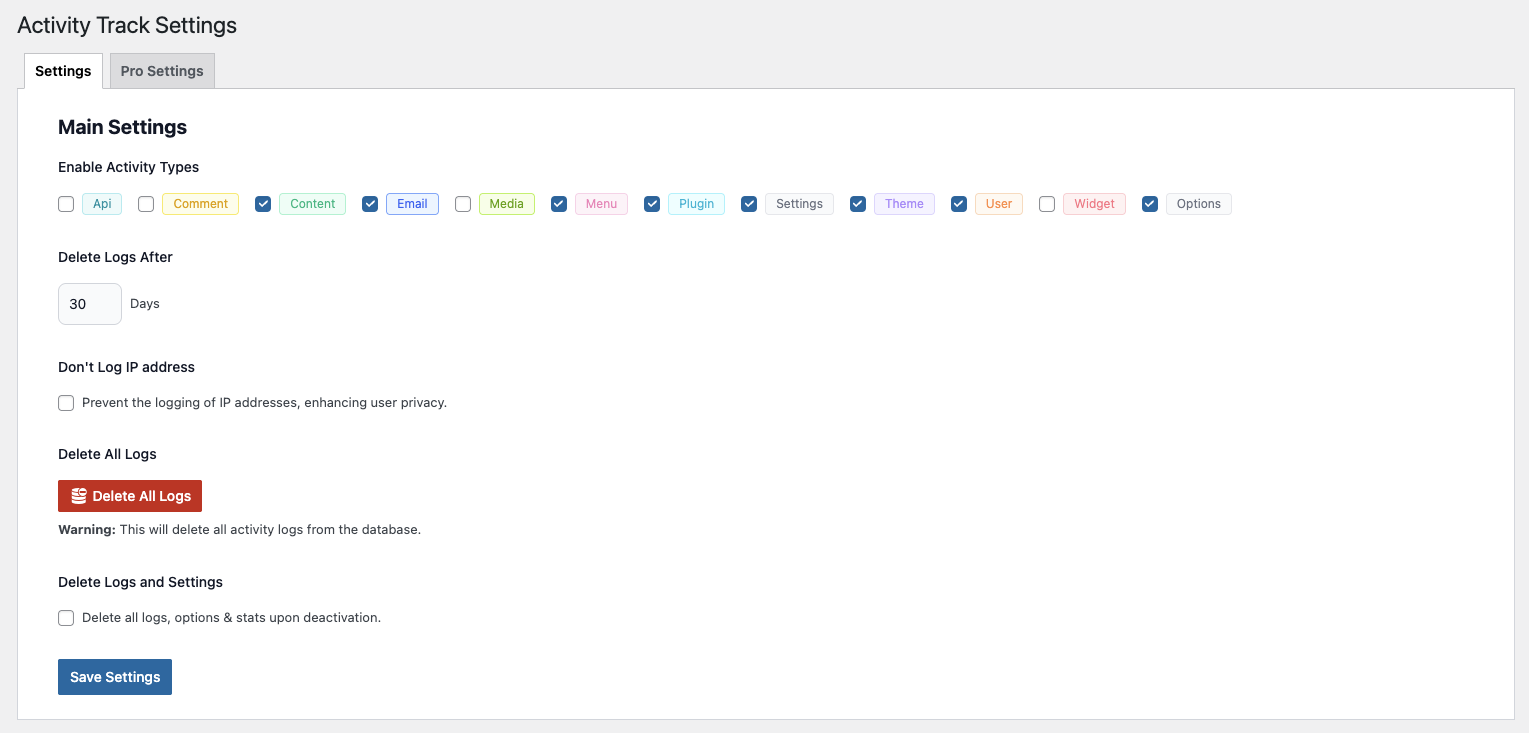
- Go to Activity Track Settings and configure your tracking preferences.
- (Optional) Upgrade to PRO on our pricing page to unlock AI summaries, VPN detection, unlimited rules, and more.
Vanliga frågor
-
Will this slow down my site?
-
No. The activity logger is optimized to be lightweight. It writes concise entries and uses indexed database tables to keep reads fast, so typical sites will not notice any performance impact.
-
What events does the activity log record?
-
Logins/logouts, failed logins, post and page edits, plugin/theme activation or updates, user/role changes, media uploads/deletions, and key settings updates. You can filter or export the audit trail as needed.
-
Where are the logs stored?
-
Logs are stored in your WordPress database. You control retention via settings; export to CSV is available for audits and compliance.
-
What versions of WordPress and PHP are supported?
-
Requires WordPress 6.4+ and PHP 8.0+. See the readme header for the tested WordPress version.
-
How do I upgrade to the PRO features?
-
Install and activate Activity Track Pro, then visit Activity Track Settings Pro Settings, enter your license key, and unlock AI summaries, VPN/Proxy detection, and unlimited notification rules.
-
Can I track activity across a multisite network?
-
Yes! The plugin is built to support multisite. Install network-wide or enable on individual sites as needed.
-
Is user data stored safely?
-
We respect privacy—IP anonymization, hashing, and GDPR/CCPA compliance options are available in Pro Settings.
Recensioner

Bidragsgivare och utvecklare
”Activity Track – User Activity Log” är programvara med öppen källkod. Följande personer har bidragit till detta tillägg.
Bidragande personer
Översätt ”Activity Track – User Activity Log” till ditt språk.
Intresserad av programutveckling?
Läs programkoden, kika på SVN-filförvaret eller prenumerera på utvecklarloggen via RSS.
Ändringslogg
1.2.3
- Added username and display-name search; exact usernames return that user’s activity logs.
- Improved empty results with clear messages, visible table controls and a Reset Filters action.
1.2.2
- Redesigned WooCommerce Activity with a compact table, filters, pagination and clearer results.
- Added order/customer History and event Details, preserving payment attempts and separate live/test history.
- Added optional Pro order grouping with latest matching events and counts.
- Kept WooCommerce views and histories commerce-focused; general logins remain in Activity Log.
- Added Pro 404 grouping, consolidated Event controls and bot filters for views and exports.
1.2.1
- Prevented recursive API logging and excluded internal geolocation requests from API logs.
- Redacted API URL query values and credentials; failed-login usernames are now displayed as text.
- Removed remote geolocation calls from event recording, restricted lookups to HTTPS, and fixed failed-lookup warnings.
- Restricted custom styles to Activity Track admin pages and added authorization and failure handling to report deletion.
- Removed redundant query preparation notices and disabled autoloading for updated notification counters.
- Forwarded IP headers now require explicitly trusted proxy addresses; otherwise the connecting IP is recorded.
- 404 tracking remains enabled by default on upgrades unless disabled in Settings; existing capture and storage limits apply.
- Added Pause/Resume recording controls to the 404 Errors page while keeping existing records accessible.
- Added a 10,000-record limit for 404 storage, deleting the oldest 1,000 records per batch before adding more.
- Added Bot and Suspected bot device labels to new and existing 404 records and CSV exports.
- Added colored recording-status badges, play/pause button icons, and clearer pause and capture-limit notices.
- Added a Select All header checkbox to the 404 Errors table for bulk deletion.
- Updated 404 pagination to match Activity Log, with item totals and first, previous, next, and last page controls.
1.2.0
- Added a dedicated 404 Errors view for recorded final front-end 404 responses, including requested URLs, referrers, and device information.
- Added 404 URL search, date filters, CSV export, and selected-record deletion.
- Added query-value redaction, bounded recording volume, and automatic cleanup using the configured retention period for 404 records.
- Added collapsible overview panels for WooCommerce Activity and 404 Errors.
- Updated release documentation and packaging instructions for the WordPress Plugin Directory.
1.1.0
- Added WooCommerce Activity in Free: account, checkout, saved payment method, and payment-outcome records with customer/order summaries.
- Added recording-coverage indicators and separate WooCommerce and Stripe webhook evidence.
- Added review notices for repeated recorded live Stripe failures, webhook replay deduplication, and separate test-mode labeling.
- Added privacy-conscious profile-change categories and grouped display with individual evidence preserved.
- Improved activity-table readability, event counts, unknown-user labels, and related URL buttons.
- Fixed CSV export submission and missing Activity values that misaligned exported columns.
- Improved compatibility with Pro log explanations and independent Free/Pro loading.
1.0.8
- Fixed WooCommerce order status changes not always being logged from the admin order edit screen.
- Improved WooCommerce tracking reliability when WooCommerce loads after Activity Track.
- Added a fallback for manual WooCommerce status changes on stores using HPOS.
- Improved activity log display by showing completed WooCommerce statuses with a green label.
- Reduced noisy Pro options logs from internal WooCommerce order-edit option updates.
1.0.7
- Added WooCommerce logging for trashed and permanently deleted orders.
- Fixed missing order links in WooCommerce log entries on stores using High-Performance Order Storage (HPOS).
- Fixed draft WooCommerce orders being logged as new orders (unfinished checkouts and unsaved admin orders are now skipped).
- Fixed WooCommerce events from payment gateways or cron being misattributed to the customer instead of the system.
- Fixed duplicate log entry when a full refund also changed the order status.
1.0.6
- Fixed tooltip display issue in the activity log.
1.0.5
- Added ’Options’ and ’WooCommerce’ activity types for better tracking.
- Improved activity log formatting for new activity types.
1.0.4
- Fixed UI issue in settings.
- Improved UI on notifications.
1.0.3
- Fixed UI issue on notifications.
1.0.2
- Fixed multisite compatibility issues.
- Fixed plugin activation/deactivation time out errors.
1.0.1
- UI improvements for settings and notifications.
1.0.0
- Initial stable release.
- Core real-time tracking, logging, and notifications.