
Beskrivning
cclin Smart Table of Contents is a lightweight and flexible TOC plugin built specifically for long-form content, tutorials, and documentation-style websites.
This plugin focuses on reading experience, content structure, and navigation clarity, making it ideal for blogs, technical articles, and knowledge bases.
Key Features
- Automatically extract headings from H2 to H6 (configurable)
- Clean and structured hierarchical TOC output
- Automatic heading numbering (1, 1.1, 1.1.1)
- Smooth scroll navigation
- Scrollspy support (active heading highlight while scrolling)
- Multiple display positions:
- Inline TOC at the top of content
- Fixed sidebar TOC
- Independent expand/collapse behavior for different TOC modes
- Auto insert TOC into content
- Support for custom post types
- Gutenberg-compatible (works seamlessly with block editor content)
- Fully internationalized (i18n ready)
- Lightweight, clean OOP architecture
Designed for
cclin Smart Table of Contents is especially suitable for:
- Long-form blog posts
- Technical tutorials
- Documentation websites
- Knowledge bases
- Structured academic or research content
Customization
Instead of requiring users to write custom CSS, the plugin provides structured options such as:
- Heading levels selection
- Numbering toggle
- Display position control
- Sticky offset settings
- Expand / collapse behavior
This ensures both flexibility and safety while maintaining performance and compatibility.
Third-Party Libraries
This plugin bundles the following third-party library:
- Select2 (https://github.com/select2/select2)
License: MIT
License file included in: /assets/vendor/select2/LICENSE
Skärmdumpar
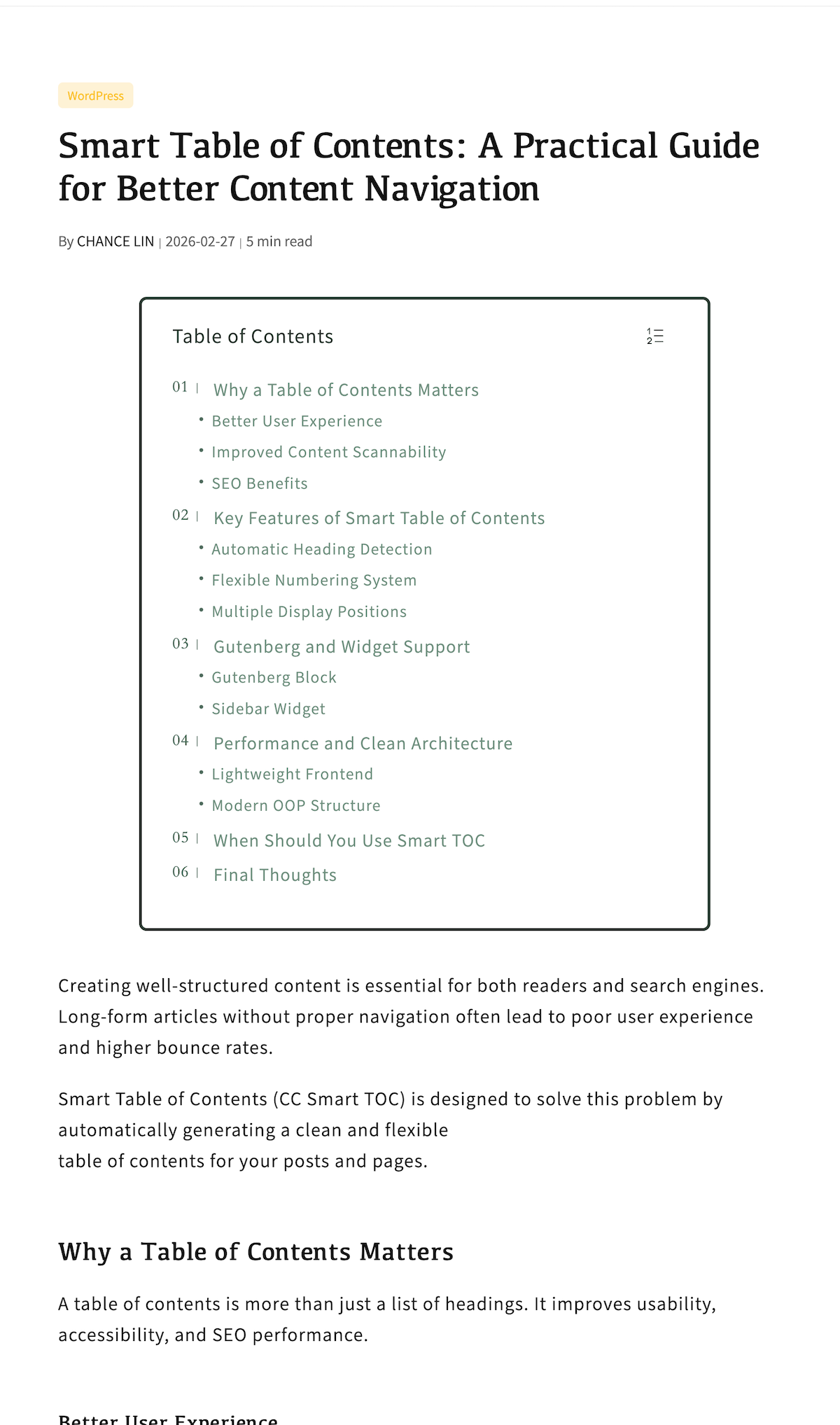
In-content table of contents automatically inserted at the top of the post 
Floating side table of contents displayed on the left with fixed positioning 
Admin panel: Basic Settings and Display Position configuration 
Admin panel: Title and List Style, Appearance & Colors, with live preview 
Admin panel: Custom Appearance & Colors with real-time live preview
Block
Detta tillägg tillhandahåller 1 block.
- Ccstoc Toc
Installation
- Upload the plugin folder
cclin-smart-tocto/wp-content/plugins/ - Activate the plugin through the “Plugins” menu in WordPress
- Go to Settings cclin Smart TOC to configure options
Vanliga frågor
-
Does this plugin support Gutenberg?
-
Yes. The TOC is automatically rendered on the frontend and works with Gutenberg blocks.
-
Can I control which headings are included?
-
Yes. You can select which heading levels (H2–H6) should be included.
-
Can I disable automatic insertion?
-
Yes. You can disable auto-insert and use manual placement instead.
Recensioner
Detta tillägg har inga recensioner.
Bidragsgivare och utvecklare
”cclin Smart Table of Contents” är programvara med öppen källkod. Följande personer har bidragit till detta tillägg.
Bidragande personer
”cclin Smart Table of Contents” har översatts till 1 språk. Tack till översättarna för deras bidrag.
Översätt ”cclin Smart Table of Contents” till ditt språk.
Intresserad av programutveckling?
Läs programkoden, kika på SVN-filförvaret eller prenumerera på utvecklarloggen via RSS.
Ändringslogg
1.0.2
- Fix CSS layout issue
1.0.1
- Remove Custom CSS feature
- Improve security compliance
- Minor code cleanup
1.0.0
- Initial release