
Beskrivning
WordPress Quiz Maker plugin
Quiz Maker is a powerful WordPress quiz plugin that helps you create interactive quizzes, online exams, personality tests, trivia quizzes, knowledge tests, IQ quizzes, true-or-false quizzes, yes-or-no quizzes, BuzzFeed-style quizzes, and more. Create questions, choose question types, customize the design, and publish engaging quizzes on your website in just a few minutes.
There are 7+ types of questions available to use:
Radio – en flervalsfråga med ett rätt svar.
Kryssruta – en flervalsfråga med fler än ett rätt svar.
Rullgardinsmeny – en flervalsfråga med ett rätt svar i form av en meny.
Text – en fråga som besvaras med fritext.
Kort text – en fråga som besvaras med en kort text.
Nummer – en fråga som besvaras med ett numeriskt svar.
Datum – en fråga som besvaras genom att välja ett datum.
Banner (HTML) – visa ett informationsmeddelande som inte kräver svar.
Fyll i luckor – be användaren komplettera meningar med saknade ord.
Matchning – be användaren para ihop objekt från två listor.
Are you looking for the best WordPress quiz plugin ? This plugin allows you to make an unlimited number of quizzes. Each QUIZ can include unlimited questions. Questions can be a single-choice, multiple-choice, dropdown, text and number. The plugin is very user-friendly and easy to use. With this WordPress questionnaire plugin you can also categorize the questions and quizzes.
This WordPress quiz plugin allows you to create various types of quizzes, including Trivia quiz, Personality test, Scored quiz, Multiple-choice quiz, Knowledge quiz, IQ test, Yes-or-no quiz, True-or-false quiz, This-or-that quiz, Diagnostic quiz, Buzzfeed quiz and etc.
Quizdemonstrationer (Gratis)
- Trivia Quiz
- Quiz med timer
- English Test
- IQ Test
- Assessment Quiz
- Lösenordsskyddad frågesport
- Audio Quiz
- Video Quiz
- Mattequiz
- One Page Quiz
Quizdemonstrationer (Pro)
- Personlighetstest
- Prov med certifikat
- Bedömningstest
- Psykologitest
- Betald frågesport (PayPal)
- Frågesport med navigeringsfält
- Flersidig frågesport
- IQ Test
- Topplistor
- Flashkort
- Anpassad pagineringstest
- Frågesport med tid per fråga
- TOEFL-övningstest
WordPress Quiz, Exam and Test maker plugin features
Skapa ett enkelt quiz
Följ dessa steg för att skapa en enkel quiz på några minuter:
- Gå till sidan Frågor och skapa nya frågor,
- Gå till sidan Frågesporter och skapa din första quiz genom att klicka på knappen Lägg till ny,
- Fill out the information by adding a title, previously created questions, and so on.
Det var allt. Din quiz är redo att glänsa.
För att infoga quizet i en sida, ett inlägg eller en textwidget, kopiera kortkoden [ays_quiz id=’quiz_id’] och klistra in den där du vill ha quizet i redigeraren.
Quiz-kortkod
[ays_quiz id=’quiz_id’]
Anpassningsbara frågor
You can make fully customizable questions by using the built-in text editor. It gives you an opportunity to format the text easily and effortlessly. You can add image, audio, and video questions. If you are a techy guy, you are free to use your HTML and CSS skills and fulfill all your needs. Last but not least, you can insert a shortcode of another plugin in the question.
Quizinställningar
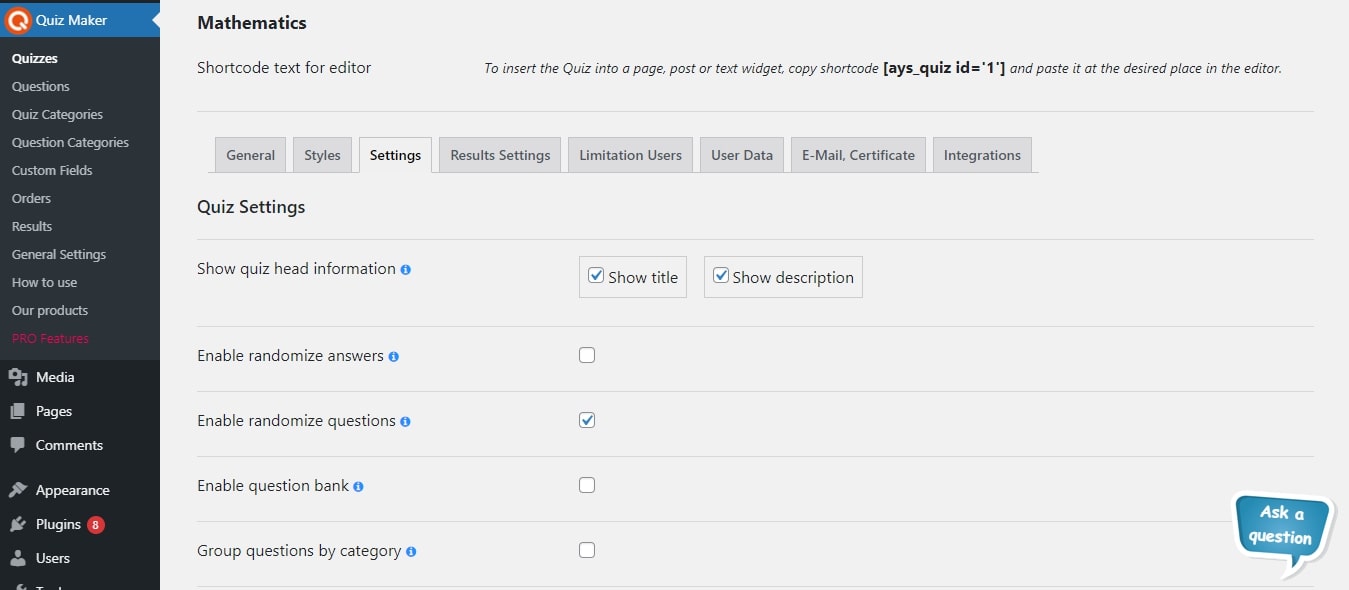
This WordPress test plugin offers dozens of options(100+) to take your quiz building to an advanced level. It allows you to fully customize all parts of your exam.
Here are presented some of those settings:
- Slumpa frågor
- Slumpa svar
- Frågebank – Exempel: lägg in 100 frågor i quizet och ställ in detta alternativ till 20. Varje gång kommer pluginet att slumpmässigt välja 20 frågor från de 100.
- Buttons text – change the buttons texts of your quizzes by going to the General Settings page
- Schemalägg – Ställ in så att ditt quiz är tillgängligt för användare vid en viss tidpunkt.
- Visa svar och förklaringar – Skriv en förklaring för varje fråga och visa den när användaren svarar.
- Omdirigera användare – Omdirigera dina deltagare till en annan sida efter att quizet är slutfört.
- Godkänd gräns – Ange godkänd poäng för ditt prov och visa olika resultatmeddelanden för godkända och underkända användare.
- Intervals Quiz PRO – show different messages according to the user’s score. This functionality allows you to create a Personality quiz.
Quiz med timer
You can set a timer for your quiz and when the timer ends, the quiz will be submitted automatically. A quiz timer option is very useful for making an online exam or test. So we can call it the WordPress Exam plugin too.
Quizresultat, poäng och datainsamlingsformulär
After successful completion of the quiz, you can track from your dashboard your visitors’ results, duration, when they start, and when they end the quiz.
We have created a beautiful form and you can choose fields of the form from the dashboard and assign this form to your quiz ( After or Before quiz ) and when the user finishes the quiz you can collect data and have beautiful statistics on your dashboard. This data allows you to create your email and SMS marketing, which will attract much more users from your specific target.
There are 3 static form fields in the free version` name, email and phone. For more custom fields you need to upgrade to the Quiz PRO version.
Also, results’ statistics with graphs and export functionality are available only in the Pro version.
Results page on the front-end
Du kan själv välja vad besökaren ska se efter att quiz, prov eller test är klart.
– Visa en framstegsmätare med procent i det sista steget
– Visa endast resultatprocent
– Visa meddelanden för godkänt/icke godkänt
– Visa användarens misstag på slutsidan
– Visa rätt svar för varje fråga (fel svar markeras med rött, rätt svar med grönt)
– Använd meddelandevariabler för att visa information som namn, resultat per kategori, antal rätt/fel svar, tid för quiz osv.
I Premium-versionen finns en kortkod för registrerade användare som kan användas för att visa deras historik på användarsidan.
Personlighetstest
Att ha ett personlighetstest på din webbplats är ett utmärkt sätt att öka engagemanget och få insikter från användardata. Om du har en e-handelswebbplats kan du erbjuda personliga erbjudanden genom att skapa personlighetstester. Du kan erbjuda olika produkter baserat på användarens val under testet. Tjäna mer pengar och få dina besökare att stanna längre. Läs artikeln Hur man skapar ett personlighetstest i WordPress för mer information.
Du kan skapa tester som Truity Enneagram-test, 16 personlighetstyper, Big 5-personlighetstest och många fler populära alternativ.
Enkät
Using our plugin you can make a Survey too. We have made text and number question types and also No influence to the score option.
It means that questions will not be counted for the final result. It stands as a survey plugin too. Also, you can make quiz and survey mixes. You can enable the Hide score option from the quiz settings and you will just collect the data which users filled in the survey.
By the way, we have also created a separate WordPress Survey plugin.
Snabbquiz
Du kan skapa ett snabbt quiz direkt från adminpanelen utan att gå till frågesidan eller quizsidan. Klicka bara på knappen för snabbquiz så visas ett modalfönster där du kan lägga till frågor och spara quizet. Observera att detta endast är för att skapa nya quiz. För att redigera quiz gör du det som vanligt via quiz- eller frågesidorna.
Quizteman, stilar och liveförhandsvisning
There are 6 themes available for making awesome quizzes.
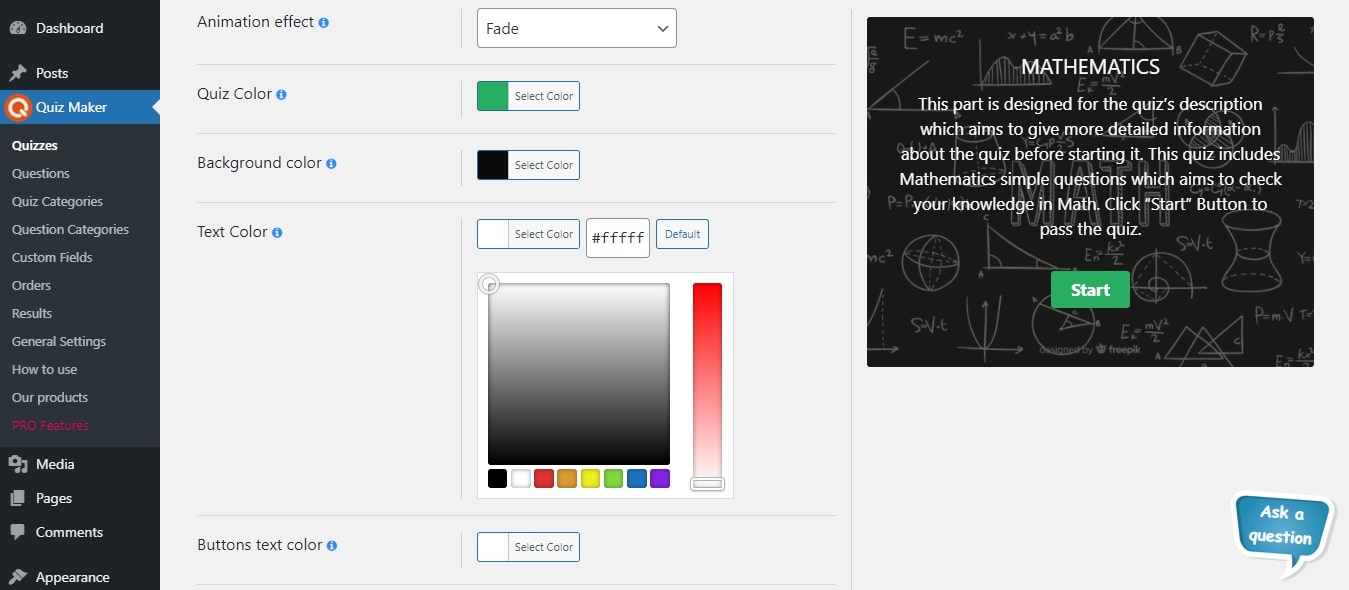
You can choose one of them and then customize it with our 50+ style options (colors, backgrounds, borders). Also, there is a live preview feature in the style section in the dashboard, which allows the admin to see every change of options. There is no need to save and go to the front end to see changes in styles. Have fun!
Begränsa quiz för användare
Du kan begränsa dina användare genom att aktivera och välja användarroller från adminpanelen, så att endast användare med valda roller kan genomföra ditt quiz. Om du inte vill begränsa efter roll har vi ett annat alternativ – aktivera helt enkelt ”Endast för inloggade användare” och skriv ett meddelande till de som inte är inloggade. På så sätt kan du utöka din gemenskap. Om ditt quiz är intressant kommer även icke-registrerade användare att skapa konto för att kunna delta, vilket ger hög trafik till din webbplats. Observera att om du väljer att begränsa efter användarroll, aktiveras automatiskt alternativet för endast inloggade användare.
PRO | DEMO | DOCUMENTATION | ALL FEATURES
Dela quiz på sociala medier
Användare kan också dela ditt quiz, test eller prov på sina sociala nätverk (Facebook, LinkedIn, Twitter), vilket är viktigt för din SMM och ökar trafiken och populariteten för din webbplats.
Ytterligare kortkoder
We have developed extra shortcodes to present more data and statistics about your users on the front end. Here are some of them:
– Single quiz results
– All results
– Question bank
– Single and global leaderboards (Pro)
– User history (Pro)
New Integration is available with Chart Builder Plugin. The integration will allow you to create beautiful charts based on your quiz data and share them with your website visitors.
För mer detaljerad information, se dokumentationen.
ANSVARSFRISKRIVNING FÖR TJÄNSTER FRÅN TREDJEPART
The plugin uses ipinfo.io API (https://ipinfo.io) in order to get users’ location by their IP address.
INGEN DATA SKICKAS OCH VI SAMLAR INTE IN NÅGON INFORMATION FRÅN BEGÄRAN
Integritetspolicyn finns på denna URL: https://ipinfo.io/privacy-policy
Funktioner
- Obegränsat antal quiz
- Obegränsat antal frågor
- Resultatblad
- Frågebild
- Quizstilar (bredd, höjd, färg, bakgrund m.m.)
- Frågebank
- Slumpa frågor
- Slumpa svar
- Endast för inloggade användare
- Visa korrekta svar
- Text för rätt/fel svar
- Quiz med timer
- Fält för insamling av användardata
- Förhandsvisning av stilar
- Stöder RTL-språk (höger-till-vänster)
Quiz PRO Features
- Inkluderar ALLA funktioner från gratisversionen samt
- Exportera och importera frågor
- Exportera resultat till CSV
- Användarens plats
- Svar med bilder
- Flersidig frågesport
- Avancerad frågebank (efter kategorier)
- Skicka e-post till användare
- Skicka e-post till administratör
- Resultattext baserat på procent
- Resultat med diagram
- Quiz med certifikat
- Manual Grading
- Custom Attributes
- Quiz-widget
- Skydd mot kopiering av innehåll
- Schemalägg quiz
- Kortkod för användarsida
- E-postkonfiguration
- Frågevikt/poäng
- Svarsvikt/poäng
- Kortkommandokod för flashkort
- Personlighetstest
- Topplistor
- Lösenordsskyddad frågesport
- Gör frågor obligatoriska
- Frontend Statistics
- User Dashboard
- Frontend Request
- Spåra användare
- Popup-frågesport
- Länkad frågesport
- Villkorade resultat
- ChatGPT Question Builder
- 15+ Integrations
- Mer är på väg …
Connect with your Favorite Tools and Plugins (Pro feature)
PayPal-integration (betald quiz), Stripe-integration (betald quiz), Mailchimp-integration, Campaign Monitor-integration, Zapier-integration, Slack-integration, Recaptcha-integration, ActiveCampaign-integration, Mad Mimi-integration, ConvertKit-integration, GetResponse-integration, Sendinblue-integration, MailerLite-integration, Mailpoet-integration, WooCommerce-integration, Easy Digital Downloads-integration, GamiPress-integration, MyCred-integration.
*Hur uppgraderar man från gratis till Pro-version utan att förlora data?
It’s your chance to add unlimited quizzes, exams, and tests with the best quiz plugin for WordPress.
Don’t forget, in case of any problems, questions or suggestions feel free to contact us via FREE SUPPORT FORUM.
New Fox LMS plugin: Use the potential of your online learning platform with the best WordPress LMS plugin. You can easily manage courses, quizzes, and progress tracking to keep learners engaged and motivated.
Andra tillägg från Ays Pro Team
- Survey Maker for collecting data and analyze it.
- Popup Box, an easy way to create eye-catching and engaging popups.
- Poll Maker for creating powerful and interactive polls.
- Secure Copy Content Protection för att skydda webbplatsinnehåll från att plagieras.
- AI ChatBot för att generera innehåll av hög kvalitet till din blogg och hitta svar på frågor på några sekunder.
- Chartify to build both static and dynamic charts, graphs and diagrams.
- Easy Form to create various forms for your website.
- Personligt ordförråd för att skapa och organisera ordlistor, studera och memorera orden.
- Photo Gallery för att visa responsiva bildgallerier med fantastiska layoutalternativ.
- FAQ Builder to display Frequently Asked Questions on your website with a beautiful accordion.
- Image Slider gör det möjligt att fånga publikens uppmärksamhet med fantastiska och underhållande bildspel.
- Widget för slumpmässiga inlägg och sidor för att skapa interna länkar och uppmuntra besökarengagemang på din webbplats.
- Popup Like Box för att marknadsföra din Facebook-sida och öka antalet gillamarkeringar.
- Advanced Related Posts låter dig visa en lista med relaterade inlägg på din webbplats efter ett inlägg eller via en widget.
- Portfolio Responsive Gallery för att visa upp vackra bildgallerier på din WordPress-webbplats.
Skärmdumpar

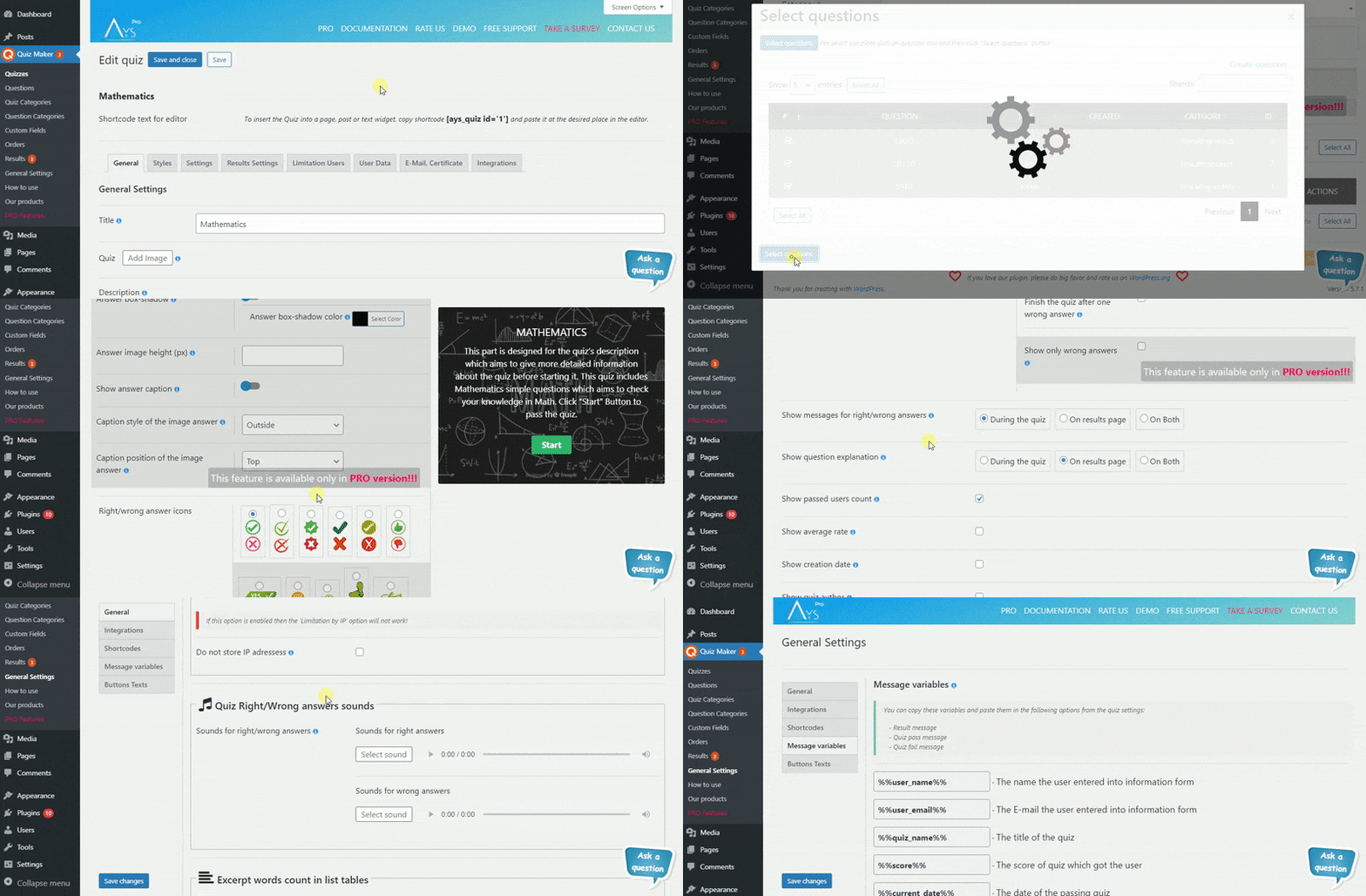
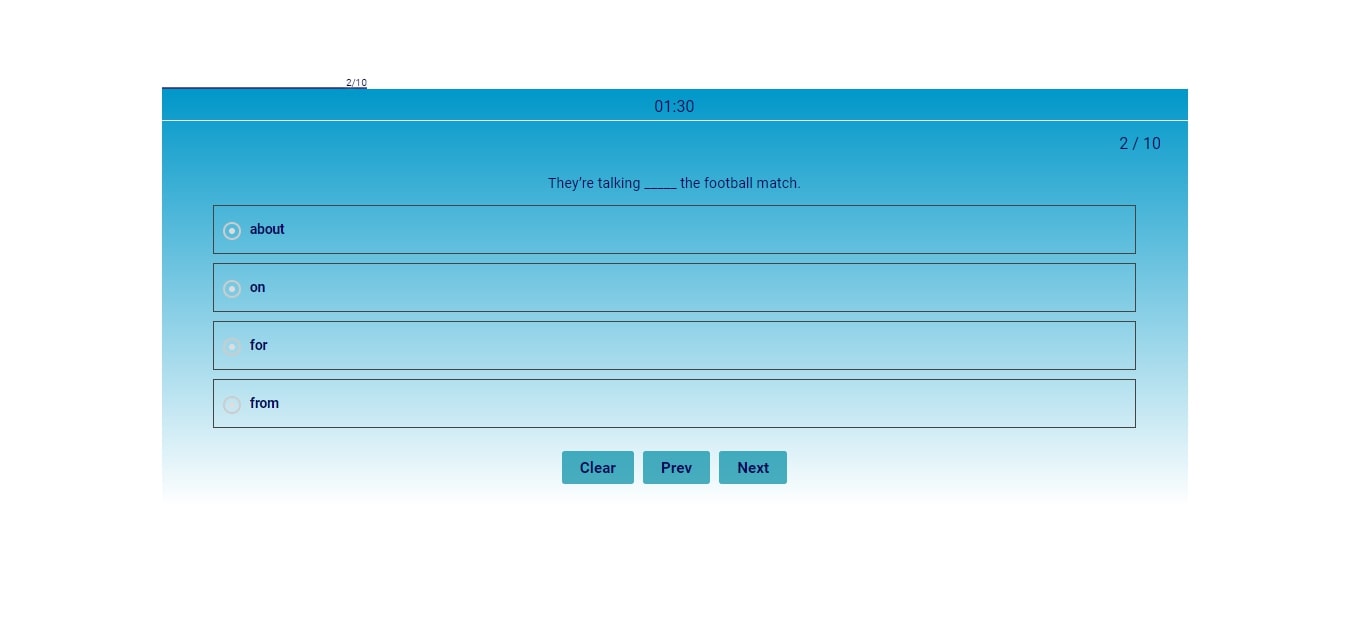

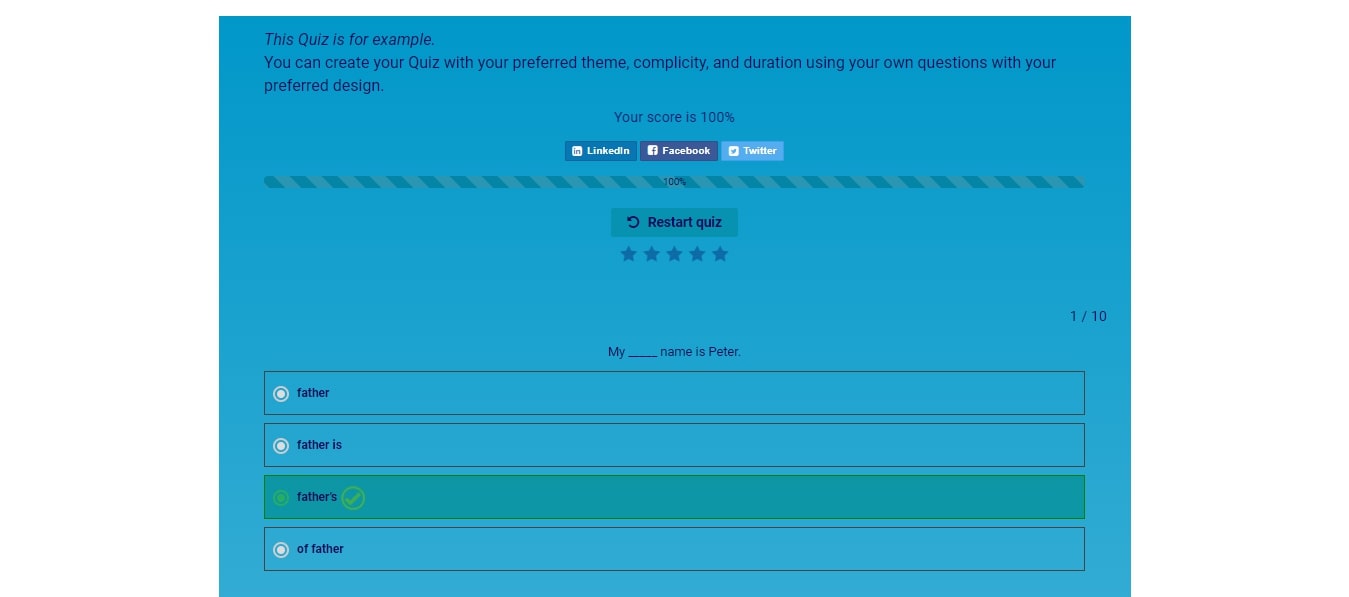
Block
Detta tillägg tillhandahåller 1 block.
- Quiz Maker
Installation
Don’t worry about the installation of your favorite quiz plugin for WordPress, as we’re here to help you! With this easy guide, you will quickly learn how to get the wp quiz plugin and enjoy its amazing features to create interactive and engaging content for your website.
There are two ways to install the Quiz maker plugin: the first way is when you are installing it from your WordPress dashboard. The second way of installing this free WordPress quiz plugin is doing it from wordpress.org.
Låt oss titta på det första och enklaste sättet att använda Quiz Maker:
- Log in to your WP dashboard.
- Go to the Plugins section on the left menu bar.
- Klicka på knappen Lägg till ny högst upp på sidan.
- Sök efter Quiz Maker.
- Klicka på knappen Installera nu.
That’s it. Simple and easy installation of the quiz plugin WordPress. The second way of the WordPress quiz plugin installation is the following:
- Ladda ner zip-filen från https://wordpress.org/plugins/quiz-maker (klicka på knappen Ladda ner).
- When you have downloaded the zip file go to the Plugins section of your Dashboard.
- Afterward, click on the Add New and then Upload plugin buttons.
- Click on the Choose file and choose quiz-maker.zip file (You can also simply drag the zip file into the Upload section).
- Klicka på knappen Installera.
Here it is. Once activated configure any options as desired and you can enjoy our best WordPress quiz plugin. Build your best WP quiz within a few minutes.
Vanliga frågor
-
Hur skapar man en fråga?
-
För att skapa en quiz-/testfråga:
– Gå till menyn Quiz Maker –> Frågor i adminpanelen.
– Klicka på knappen Lägg till ny för att skapa en ny fråga.
– Fyll i information om frågan:
– Lägg till en bild som visas överst på frågan (valfritt).
– Skriv in frågan i textfältet.
– Välj en kategori för frågan (du kan skapa en kategori under Frågekategorier).
– Välj en frågetyp.
– Lägg till svarsalternativ och markera vilka som är korrekta.
– Klicka på Spara fråga och frågan sparas.
Du kan alltid gå tillbaka och redigera frågan i Frågor-sektionen. -
Hur skapar man ett quiz?
-
In order to make a quiz/test:
– Go to the Quiz Maker menu -> Quizzes page from the admin dashboard.
– Click Add New button to add/make a new quiz/test.
– Fill out some info about the quiz/test:
– Add the quiz title and description, which will show at the start of a quiz/test.
– Choose a category for the quiz/test (You can make a category from the Quiz Categories section).
– Choose some questions:
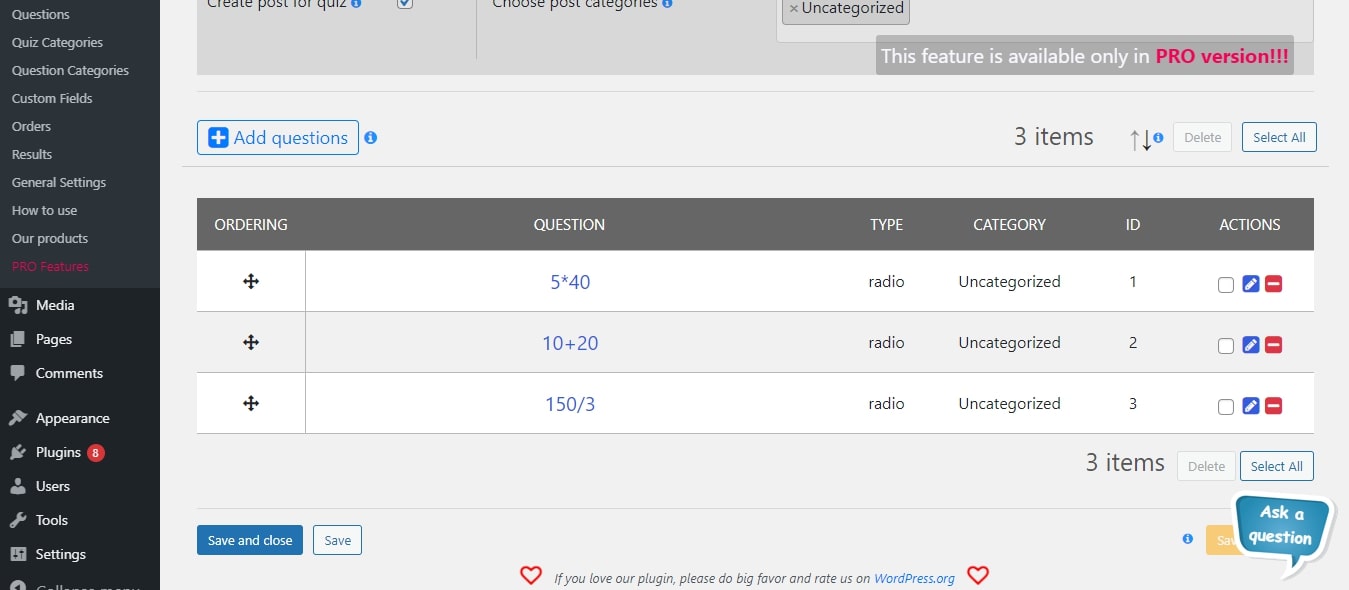
– Click the + button beside the Questions title.
– Choose the question which you would like to include in the exam/quiz.
– Hit Select Questions to add the questions to your exam/quiz.
– Hit Save Quiz button and your quiz will be saved.
You can always come back and edit the quiz from the Quizzes section. -
Hur infogar man ett quiz i ett inlägg eller en sida?
-
Now that you have already created your questions and added them to your quiz, you’re wondering how to insert the quiz into your website. It’s so easy, here’s how to do it:
– After creating a quiz, a shortcode will be shown beside the quiz in the Quizzes section.
– Copy that shortcode and go to the page or post that you want to put the quiz into.
– Finally, paste the shortcode wherever you want in the editor, at the top, bottom and even in the middle of the page.
– You now have a beautiful working quiz on your website. Enjoy!
If you’re wondering how to make a quiz, it’s easy, just check ”Is it easy to create a quiz with Quiz Maker?” above and check the instructions. -
Är det enkelt att skapa ett quiz med Quiz Maker?
-
Creating a quiz with Quiz Maker is so easy that, you can have a full quiz or an exam test in just a minute or so:
– First, create a Question Category to specify the type of questions that you’ll make. (Instructions above)
– Then, create as many questions as you want for the quiz or exam test from the Questions section, choose that newly made category, add an image (optional) and save your questions. (For more info, check instructions above)
– Now, create a Quiz Category to specify the type of the quiz that you’ll make. (Instructions above)
– Then, create a quiz from the Quizzes section, add the needed details, choose the questions that you previously made for this quiz from the Questions chooser and save the quiz. (For more info, check instructions above)
– Finally, the last step is to copy the shortcode which is shown after you make a quiz and insert it into one or many of your posts or pages.
– Voila, you now have a beautiful working quiz on your website. Enjoy! -
Hur många frågetyper finns det?
-
Det finns 7 frågetyper att använda:
- Radio
- Kryssruta
- Rullgardinsmeny
- Text
- Kort text
- Nummer
- Datum
It is essential to mention that you can add media to your fully customizable questions no matter the type you chose. Check out demo of Quiz With Different Question Types. It combines all types of questions this WordPress quiz plugin offers.
-
Finns det någon gräns för antal frågor eller frågesporter?
-
Nej, det finns inga begränsningar. Oavsett om du använder gratis- eller premiumversionen, kan du skapa obegränsat antal frågesporter med obegränsat antal frågor. Dessutom finns det ingen gräns för hur många som kan delta samtidigt. Ta chansen och prova det själv!
Anyway, it is relevant to mention that there are cases when the hosting provider can set some limits via PHP parameters. For instance, if you wish to include more than 1000 questions in your quiz, increase the max_input_vars parameter which is set as 1000 in most cases. Another parameter is the max_execution_time, which also needs to be much higher while dealing with huge amounts of questions and quizzes. Once again, please note that the plugin itself does not have any limits. So, when you face an issue related to limitations, please contact your hosting provider in the first place.
-
Can I translate this plugin?
-
Of course, you can! This WordPress questionnaire plugin is fully translatable. You can make use of the Loco Translate WordPress plugin which is trusted by hundreds of our clients. Furthermore, you can take a look at the following useful article for further information.
-
Varför ska jag köpa PRO-paketet?
-
There are plenty of reasons! Firstly, you can create advanced level quizzes and exams with the dozens of available functions of the Premium versions. But most importantly, the Premium versions provide Support and Update. Check out the changelog of the quiz plugin and see the frequency of updates and added options on each update. It is important to mention, that all suggestions are welcomed. Hence, feel free to share your valuable feedback with us anytime.
-
Finns det någon dokumentation eller användarguide?
-
Sure! Check out the following User Manual to find out all the possibilities the plugin gives. There you will find descriptions about options, instructions on how to use them, detailed video tutorials, installation of the plugin, and so on. In case of any question or support request, do not hesitate to reach out to our support team specialist via the following FREE support forum.
-
Hur uppgraderar jag till PRO-versionen utan att förlora min data?
-
With just one hit! All you need to click on the Upgrade button instead of the Deactivate one while deactivating the plugin. It will save all the data (quizzes, questions, results, etc ) of the quiz plugin. Look into the following update guide for detailed information.
-
Kan jag skapa ett personlighetstest (Pro)?
-
Sure, you can! Firstly, please note that you need to have a Premium version of the plugin to create a personality test on your WordPress website. You need to assign keywords to your answers in the first place such as A, B, C, D, and etc. Then, you need to type in keyword-based result messages such as A – Absolutely perfect! Keep it up, B – Nice shot! Keep it going and so on. At the end of the test, each user will see the most fitting result text based on the majority of the chosen answers. For more information go through How to create a Personality Test in WordPress – Step-by-step Guide in our blog.
-
Kan jag skicka certifikat efter att quizet är slutfört (Pro)?
-
Yes, you can do that so easily and effortlessly with our best WordPress quiz plugin! It can auto-generate certificates and email them to your test takers when they successfully pass your quiz. To activate the functionality, please go to the Email & Certificate tab of the plugin and tick on the checkbox next to Send certificate to user option. You can customize the following suboptions: certificate pass score, certificate title, certificate body, certificate orientation, certificate background image, and certificate frame. Moreover, you can preview it from your WordPress dashboard before sending it to your users. Amazing, isn’t it?
-
Kan jag dölja resultatet och skicka det via e-post till deltagarna (Pro)?
-
We thought about the lead generation of your company, as well! This super-effective method can skyrocket your email lists in few days. Our WordPress exam plugin allows you to hide the result of the user and send it to them via email. To achieve that, please go to the Results Settings tab of the given quiz and activate the Hide score option. Then, go to the User Data tab and activate the Information form, and drag-and-drop the Email field from the available field to the active one in order to ask for an email address from your quiz takers before or after the test. As a final step, go to the Email & Certificate tab and activate the Skicka e-post till användare option. Make use of Message variables to include user info in the email content.
-
Kan jag skapa betalda frågesporter (Pro)?
-
Want to make money with the trivia quiz you have created just now? We will make it happen! All you need is to connect the plugin to your PayPal account, choose the payment type and enter your preferred amount and the currency. There are two payment types to choose from – Lifetime payment and Onetime payment.
The Lifetime payment means that the user will pay once at first and will have access to the given quiz any time starting from that moment, while the Onetime payment means that the user needs to pay each time individually for having access to the quiz. -
Hur lägger man till matematiska ekvationer i frågor?
-
Do you wonder how to create a Math Quiz with hard mathematical equations in WordPress? It is easier than you think. The Quiz Maker plugin itself does not have the functionality for adding math equations into questions. For adding math equations into the Quiz and Survey Maker plugin you can make use of several math equation plugins such as MathJax – LaTex plugin. For adding the math equations just install and activate the mentioned plugin. It is one of the easiest math plugins. With the help of it, you can add as many equations as you need, even if they include several symbols. In this demo, you can see a step-by-step tutorial on how to use MathJax. You have to be careful to use less-than signs, ampersands, and other HTML special characters within your math equations.
For example, to add a squared symbol, you need to write down the following sign ^2. (do not forget to insert $ character to mark the beginning and ending).
Recensioner


Bidragsgivare och utvecklare
”Quiz Maker by AYS” är programvara med öppen källkod. Följande personer har bidragit till detta tillägg.
Bidragande personer
”Quiz Maker by AYS” har översatts till 19 språk. Tack till översättarna för deras bidrag.
Översätt ”Quiz Maker by AYS” till ditt språk.
Intresserad av programutveckling?
Läs programkoden, kika på SVN-filförvaret eller prenumerera på utvecklarloggen via RSS.
Ändringslogg
6.7.1.70 ( Aug 21, 2026 )
- Added: Default text customization option for the Already passed quiz message
6.7.1.69 ( Aug 17, 2026 )
- Improved: Made some changes to the admin dashboard
- Uppdaterat: POT-fil
6.7.1.68 ( Aug 14, 2026 )
- Added: Password for passing quiz option to the Quick Quiz popup
6.7.1.67 ( Aug 12, 2026 )
- Added: Question image border-radius option for mobile devices
- Tested: Compatible up to WordPress 7.0.3
6.7.1.66 ( Aug 10, 2026 )
- Added: Default text customization option for the Quiz expired message text
6.7.1.65 ( Aug 06, 2026 )
- Added: Shortcode copy button to the Quiz Categories list table
6.7.1.64 ( Aug 04, 2026 )
- Added: Limitation count of takers option to the Quick Quiz popup
6.7.1.63 ( Jul 31, 2026 )
- Added: Default text customization option for the ”Created by” text
6.7.1.62 ( Jul 28, 2026 )
- Added: Show Login form supoption to the Quick Quiz popup
- Uppdaterat: POT-fil
6.7.1.61 ( Jul 24, 2026 )
- Added: Only for logged in users option to the Quick Quiz popup
6.7.1.60 ( Jul 22, 2026 )
- Added: Enable strip slashes for new questions option to the General Settings page
6.7.1.59 ( Jul 20, 2026 )
- Tested: Compatible up to WordPress 7.0.2
- Fixed: Use HTML for answers option visibility when changing the question type
6.7.1.58 ( Jul 17, 2026 )
- Added: Limit Users option to the Quick Quiz popup
6.7.1.57 ( Jul 15, 2026 )
- Added: Shortcode copy button to the Quizzes list table
6.7.1.56 ( Jul 13, 2026 )
- Added: Pass Score option in the Quick Quiz popup
- Tested: Compatible up to WordPress 7.0.1
6.7.1.55 ( Jul 08, 2026 )
- Added: Message variables section for the Expiration message suboption
6.7.1.54 ( Jul 06, 2026 )
- Added: Default text customization option for the ”Quiz schedule start message” text
6.7.1.53 ( Jul 03, 2026 )
- Added: Mobile quiz content max-width option in the Quick Quiz popup
- Uppdaterat: POT-fil
6.7.1.52 ( Jul 01, 2026 )
- Added: Default text customization option for the ”Logged in users default message” text
6.7.1.51 ( Jun 26, 2026 )
- Added: Button border-radius option for mobile devices
6.7.1.50 ( Jun 24, 2026 )
- Added: Desktop quiz content max-width option in the Quick Quiz popup
6.7.1.49 ( Jun 22, 2026 )
- Added: Default text customization option for the ”Created on” text
6.7.1.48 ( Jun 19, 2026 )
- Added: 50% Pass Score option to the default quiz
- Added: Admin demo button to the feature popups
- Improved: Pass score message handling for Fox LMS integration compatibility
6.7.1.47 ( Jun 15, 2026 )
- Added: Enable Keyboard Navigation option for the Quick Quiz popup
- Fixed: Unicode character saving in the Fields texts options
6.7.1.46 ( Jun 12, 2026 )
- Added: Menu badge style option in the General Settings page
6.7.1.45 ( Jun 10, 2026 )
- Fixed: Non-Latin characters handling in the Buttons texts options
- Fixed: Unicode character saving in the Text Customizations options
6.7.1.44 ( Jun 03, 2026 )
- Added: Default text customization option for the ”Start button loading text”
- Improved: Style compatibility with WordPress 7.0
6.7.1.43 ( Jun 01, 2026 )
- Added: Enable Question reporting option for the Quick Quiz popup
6.7.1.42 ( May 27, 2026 )
- Added: Helpful tip on the quiz edit page
- Improved: Code correction on the admin dashboard
6.7.1.41 ( May 25, 2026 )
- Added: Pass Score option toggle in the Results Settings tab
- Improved: Pass and fail message handling when the Pass Score option is disabled
- Improved: Quiz edit page top action buttons responsiveness
- Uppdaterat: POT-fil
6.7.1.40 ( May 22, 2026 )
- Added: Ordering buttons section on the General Settings Page
- Added: Button ordering options for desktop and mobile views
- Added: Live preview for quiz button ordering in the Style tab
- Added: Button preview visibility for disabled buttons
- Tested: Compatible up to WordPress 7.0
6.7.1.39 ( May 20, 2026 )
- Added: Question background image option
- Improved: User information request handling for quiz autofill
6.7.1.38 ( May 18, 2026 )
- Added: User answer explanation option
- Improved: Preview notice shortcode visibility
- Improved: Publish tab shortcode copy and help actions
- Fixed: Checklist popup controls visibility on smaller screens
6.7.1.37 ( May 15, 2026 )
- Added: Preview button to the quiz edit page top action bar
- Improved: Improved the Message Variables dropdown design
- Improved: Quiz edit page action buttons responsiveness on smaller screens
- Fixed: Quiz edit page tab navigation arrows generating NaN scroll values
6.7.1.36 ( May 14, 2026 )
- Added: New Publish page to the Quizzes Edit page
- Added: Notice for draft preview pages with a copy shortcode button
- Improved: The Quiz Maker admin top banner and improved its responsive layout
- Improved: Quiz builder and question edit page UI/UX
- Improved: Question edit page layout and field positioning
- Uppdaterat: POT-fil
6.7.1.35 ( May 12, 2026 )
- Improved: Some style and content changes on the admin dashboard
- Updated: Several YouTube video resources on the dashboard
6.7.1.34 ( May 07, 2026 )
- Added: Mobile Font weight option for wrong answers in the Quick Quiz popup
6.7.1.33 ( May 05, 2026 )
- Added: Default text customization option for the ”Question Report icon text”
6.7.1.32 ( Apr 30, 2026 )
- Added: Mobile letter spacing option for wrong answers in the Quick Quiz popup
- Improved: Admin dashboard link handling and navigation
- Improved: Code quality on the admin dashboard
- Uppdaterat: POT-fil
6.7.1.31 ( Apr 27, 2026 )
- Improved: CSS issue with the Elegant Light/Dark quiz theme on the front end
- Improved: Report question popup style conflicts with some WordPress themes
6.7.1.30 ( Apr 22, 2026 )
- Improved: Handling and rendering of user-submitted review data
- Fixed: Review display inconsistencies in quiz results and reviews list
6.7.1.29 ( Apr 20, 2026 )
- Added: FAQ section on the dashboard page
- Improved: Dashboard page enhancements
- Uppdaterat: POT-fil
6.7.1.28 ( Apr 17, 2026 )
- Added: Report submit button text customization option in General Settings
6.7.1.27 ( Apr 15, 2026 )
- Added: Text decoration option for wrong answers in the Quick Quiz popup
6.7.1.26 ( Apr 13, 2026 )
- Added: Default text customization option for the ”Empty Report message text”
6.7.1.25 ( Apr 09, 2026 )
- Added: Text transformation option for wrong answers in the Quick Quiz popup
6.7.1.24 ( Apr 07, 2026 )
- Added: Default text customization option for the ”Report submitted message Text”
- Tested: Compatible up to WordPress 7.0
6.7.1.23 ( Apr 03, 2026 )
- Added: Font weight option for right answers in the Quick Quiz popup
6.7.1.22 ( Apr 01, 2026 )
- Added: Default text customization option for the ”What’s wrong report question Text”
6.7.1.21 ( Mar 30, 2026 )
- Added: Default text customization option for the ”Report a question Text”
- Improved: Some changes on the admin dashboard
- Fixed: Conflict between Disable data storing in database and quiz assessment options
6.7.1.20 ( Mar 25, 2026 )
- Uppdaterat: POT-fil
- Fixed: Timer start problem on the Information Form step
6.7.1.19 ( Mar 23, 2026 )
- Added: Mobile letter spacing option for right answers in the Quick Quiz popup
6.7.1.18 ( Mar 20, 2026 )
- Added: WhatsApp social share button option for quiz result pages
6.7.1.17 ( Mar 16, 2026 )
- Added: Mobile text transformation option for right answers in the Quick Quiz popup
- Improved: Enhanced HTML sanitization logic in quiz editors
- Improved: Extended allowed HTML tags support (audio, video, etc.)
- Tested: Compatible up to WordPress 6.9.4
- Fixed: Issues with stripping valid HTML content in quiz questions and answers
6.7.1.16 ( Mar 13, 2026 )
- Improved: Enhanced validation for quiz rating submissions
- Improved: Additional checks for question reporting functionality
6.7.1.15 ( Mar 10, 2026 )
- Added: Mobile text transformation option for right answers in the Quick Quiz popup
- Uppdaterat: POT-fil
- Improved: Code quality on the questions edit page
- Improved: Code correction in quiz rating functionality
- Improved: Code correction in question report functionality
6.7.1.14 ( Mar 05, 2026 )
- Added: Mobile font weight option for question explanations in the Quick Quiz popup
- Fixed: Fade animation and Previous button display issue in quizzes
6.7.1.13 ( Mar 02, 2026 )
- Added: Mobile letter spacing option for question explanations in the Quick Quiz popup
- Improved: Code correction on the front-end
6.7.1.12 ( Feb 25, 2026 )
- Improved: Message variables handling in WP Editor fields
- Improved: Code correction on the quizzes edit page
- Fixed: Issue with result page display when redirect after submission was enabled without a URL
6.7.1.11 ( Feb 23, 2026 )
- Improved: Code quality on the quiz edit page
6.7.1.10 ( Feb 19, 2026 )
- Added: Mobile text decoration option for question explanations in the Quick Quiz popup
6.7.1.9 ( Feb 16, 2026 )
- Improved: Elementor popup and quiz compatibility on the front-end
- Improved: Quiz Start button and AJAX content compatibility
- Improved: Code quality on the quiz edit page
6.7.1.8 ( Feb 13, 2026 )
- Uppdaterat: POT-fil
- Improved: Code quality on the quiz edit page
- Fixed: Front-end issue with WPBakery plugin integration
6.7.1.7 ( Feb 11, 2026 )
- Improved: Code correction on the quizzes edit page
- Improved: Some Style changes on the admin dashboard
- Fixed: Menu visibility issues for the Instructor role in Fox LMS
- Fixed: Quiz image printing problem on the front-end
6.7.1.6 ( Feb 09, 2026 )
- Added: Mobile text transformation option for question explanations in the Quick Quiz popup
- Improved: Some changes on the quizzes edit page
- Fixed: Quiz image saving problem
6.7.1.5 ( Feb 04, 2026 )
- Added: Excerpt words count option for Question reports list table
- Tested: Compatible up to WP 6.9.1
6.7.1.4 ( Feb 02, 2026 )
- Added: Admin Note mobile letter spacing option for the Quick Quiz Popup
- Improved: Code correction on the General Settings page
6.7.1.3 ( Jan 30, 2026 )
- Improved: Code correction on the admin dashboard
- Fixed: Minor issues in admin dashboard list tables
6.7.1.2 ( Jan 23, 2026 )
- Improved: Code correction on the General Settings page
6.7.1.1 ( Jan 21, 2026 )
- Added: Admin Note mobile letter spacing option for the Quick Quiz Popup
- Improved: Code correction on the General Settings page
6.7.1.0 ( Jan 19, 2026 )
- Added: Font weight option for Wrong answer on mobile devices
- Improved: Code correction on the General Settings page
6.7.0.99 ( Jan 16, 2026 )
- Added: Border radius option for question images
- Improved: Code correction on the admin dashboard
6.7.0.98 ( Jan 14, 2026 )
- Improved: Some changes on the admin dashboard
- Improved: Code correction on the General Settings page
6.7.0.97 ( Jan 12, 2026 )
- Added: Font weight option for Right answer on mobile devices
- Uppdaterat: POT-fil
6.7.0.96 ( Jan 09, 2026 )
- Added: Site description message variable on the General Settings Page
- Improved: Some changes on the General Settings page
6.7.0.95 ( Jan 07, 2026 )
- Added: Font weight option for Question explanation on mobile devices
- Improved: Some changes on the quizzes edit page
6.7.0.94 ( Jan 05, 2026 )
- Added: Font weight option for admin notes on mobile devices
- Fixed: Check button position on the front end
6.7.0.93 ( Dec 29, 2025 )
- Added: Show Quiz Image option
- Improved: Some changes on the quizzes edit page
6.7.0.92 ( Dec 26, 2025 )
- Added: Admin Note mobile text transformation option for the Quick Quiz Popup
6.7.0.91 ( Dec 24, 2025 )
- Improved: Some changes on the admin dashboard
- Improved: Code correction on the quizzes edit page
6.7.0.90 ( Dec 17, 2025 )
- Uppdaterat: POT-fil
- Fixed: Fatal Error on the WP Dashboard page widget
6.7.0.89 ( Dec 16, 2025 )
- Improved: Permission checks and nonce validation in admin list tables
- Improved: Validation and access control
6.7.0.88 ( Dec 10, 2025 )
- Added: Admin Note mobile text transformation option for the Quick Quiz Popup
- Improved: Some changes on the admin dashboard
6.7.0.87 ( Dec 08, 2025 )
- Added: Disable Live Chat icon option on the General Settings Page
- Improved: Code correction on the admin dashboard
6.7.0.86 ( Dec 04, 2025 )
- Added: Letter spacing option for wrong answer text on mobile devices
- Improved: Some changes on the admin dashboard
6.7.0.85 ( Dec 01, 2025 )
- Added: Letter spacing option for right answer text on mobile devices
- Improved: Several enhancements on the Question Edit page
- Tested: Compatible up to WP 6.9
- Fixed: CSS conflict with the WPSchoolPress plugin
6.7.0.84 ( Nov 27, 2025 )
- Added: Edit Answer Image icon on the Question Edit page
- Added: Admin notice on the Quiz Edit page
6.7.0.83 ( Nov 24, 2025 )
- Improved: Some changes on the admin dashboard
6.7.0.82 ( Nov 19, 2025 )
- Added: ”Black Friday Deal” Banner
- Improved: Some changes on the admin dashboard
6.7.0.81 ( Nov 17, 2025 )
- Fixed: Issue in the Reviews list table
- Fixed: Front-end issue when checking correct answers
6.7.0.80 ( Nov 12, 2025 )
- Added: Question explanation text Letter Spacing option for mobile devices
6.7.0.79 ( Nov 10, 2025 )
- Fixed: Debugging problem
- Uppdaterat: POT-fil
6.7.0.78 ( Nov 10, 2025 )
- Added: Admin note text Letter Spacing option for mobile devices
6.7.0.77 ( Nov 07, 2025 )
- Added: Wrong answer text decoration option for mobile devices
- Improved: Some changes on the admin dashboard
6.7.0.76 ( Nov 05, 2025 )
- Added: Caption position of the image answer option
- Changed: Moved the Answer list view option to the Styles tab
6.7.0.75 ( Nov 03, 2025 )
- Added: Show answer caption option
6.7.0.74 ( Oct 31, 2025 )
- Added: Answer image height option
6.7.0.73 ( Oct 28, 2025 )
- Added: Answer image functionality
6.7.0.72 ( Oct 24, 2025 )
- Added: Right answer text decoration option for mobile devices
6.7.0.71 ( Oct 22, 2025 )
- Improved: Code correction on the admin dashboard
6.7.0.70 ( Oct 20, 2025 )
- Improved: Some changes on the admin dashboard
6.7.0.69 ( Oct 17, 2025 )
- Added: Question explanation text decoration option for mobile devices
6.7.0.68 ( Oct 13, 2025 )
- Improved: Quiz edit page tab navigation on mobile and tablet devices
- Fixed: Image display issue on the questions list table
6.7.0.67 ( Oct 8, 2025 )
- Changed: Quiz Animation effect default value to None
- Fixed: Question No influence to score and Checked answer options conflict
- Fixed: Checkbox minimum selection number and Finish the quiz after one wrong answer options conflict
- Fixed: Finish button and Checkbox minimum selection number option conflict
- Fixed: Buttons border styles problem on the front-end
6.7.0.66 ( Oct 4, 2025 )
- Changed: Show correct answers option logic during the quiz
- Fixed: Code correction on the front-end
6.7.0.65 ( Oct 1, 2025 )
- Improved: Some changes on the admin dashboard
- Fixed: Code correction when submitting quiz on the front-end
6.7.0.64 ( Sep 29, 2025 )
- Added: Question Report Statistics in the Dashboard Widget
- Added: Option to disable Question Report item notifications in General Settings
6.7.0.63 ( Sep 25, 2025 )
- Added: Enable question reporting option
- Added: Question reporting List Table
6.7.0.62 ( Sep 22, 2025 )
- Improved: Question Answers table
- Uppdaterat: POT-fil
6.7.0.61 ( Sep 20, 2025 )
- Added: Don’t show quiz suboption for Schedule the quiz
6.7.0.60 ( Sep 18, 2025 )
- Added: Assessment Placeholder text suboption for the Quick Quiz Popup
- Uppdaterat: POT-fil
6.7.0.59 ( Sep 15, 2025 )
- Changed: Some changes on the quizzes and questions page
6.7.0.58 ( Sep 13, 2025 )
- Added: Dashboard menu item
- Changed: Inserting Questions List Table on the Quiz edit page
6.7.0.57 ( Sep 9, 2025 )
- Improved: Some changes on the admin dashboard
- Förbättrat: Vissa ändringar på sidan för quizredigering
- Uppdaterat: POT-fil
- Changed: Steps on the How to use page
- Fixed: Code correction on the front-end
6.7.0.56 ( Sep 4, 2025 )
- Uppdaterat: POT-fil
- Improved: Some changes on the admin dashboard
6.7.0.55 ( Sep 1, 2025 )
- Added: Admin note text decoration option for mobile devices
6.7.0.54 ( Aug 28, 2025 )
- Added: Make the review field required suboption for the Quick Quiz Popup
6.7.0.53 ( Aug 25, 2025 )
- Improved: Code correction on the front-end
6.7.0.52 ( Aug 21, 2025 )
- Added: Enable Comment Field suboption for the Quick Quiz Popup
6.7.0.51 ( Aug 19, 2025 )
- Added: Wrong answer text transformation option for mobile devices
6.7.0.50 ( Aug 14, 2025 )
- Improved: Some Style changes on the quiz edit page
- Improved: Code correction on the General Settings Page
6.7.0.49 ( Aug 11, 2025 )
- Uppdaterat: POT-fil
- Improved: Some changes on the admin dashboard
6.7.0.48 ( Aug 7, 2025 )
- Added: Display all reviews button suboption for the Quick Quiz Popup
6.7.0.47 ( Aug 4, 2025 )
- Added: Right answer text transformation option for mobile devices
6.7.0.46 ( Jul 31, 2025 )
- Added: Enable users’ anonymous assessment suboption for the Quick Quiz Popup
6.7.0.45 ( Jul 28, 2025 )
- Added: Question explanation text transformation option for mobile devices
6.7.0.44 ( Jul 25, 2025 )
- Added: Admin note text transformation option for mobile devices
6.7.0.43 ( Jul 24, 2025 )
- Added: Make responses anonymous suboption for the Quick Quiz Popup
6.7.0.42 ( Jul 21, 2025 )
- Added: Recent Quizzes Shortcode on the General Settings Page
- Improved: Minified CSS files on the front-end
6.7.0.41 ( Jul 17, 2025 )
- Added: Enable Keyboard Navigation option
- Improved: Some changes on the admin dashboard
6.7.0.40 ( Jul 16, 2025 )
- Tillagt: Alternativ för att inaktivera fokus på inmatningsfält
- Improved: Minified JavaScript files on the admin dashboard
6.7.0.39 ( Jul 10, 2025 )
- Uppdaterat: Spanska översättningar
- Förbättrat: Meddelandefunktionens beteende
- Förbättrat: HTML-strukturen för inbäddade iframes
- Improved: Minified CSS files on the admin dashboard
6.7.0.38 ( Jul 7, 2025 )
- Improved: Code correction on the admin dashboard
6.7.0.37 ( Jul 4, 2025 )
- Added: Create Question button on the quizzes edit page
- Improved: Some changes on the admin dashboard
6.7.0.36 ( Jul 3, 2025 )
- Fixed: Checklist Opening/Closing problem on the admin dashboard
6.7.0.35 ( Jul 2, 2025 )
- Added: Checklist Guide on the admin dashboard
6.7.0.34 ( Jun 30, 2025 )
- Tillagt: Stöd för slovenska språket
- Fixed: Empty question inserting problem on the Quizzes Edit page
6.7.0.33 ( Jun 27, 2025 )
- Improved: Styles on the admin dashboard
6.7.0.32 ( Jun 26, 2025 )
- Tillagt: Stöd för litauiska språket
- Tillagt: Stöd för estniska språket
- Förbättrat: Vissa ändringar på sidan för quizredigering
6.7.0.31 ( Jun 25, 2025 )
- Förbättrat: Vissa ändringar på sidan för frågeredigering
- Improved: Code correction on the admin dashboard
6.7.0.30 ( Jun 23, 2025 )
- Improved: Page speed optimization on the admin dashboard
6.7.0.29 ( Jun 20, 2025 )
- Tillagt: Stöd för kroatiska språket
- Tillagt: Stöd för ukrainska språket
- Tillagt: Stöd för bulgariska språket
- Tillagt: Stöd för lettiska språket
- Tillagt: Stöd för polska språket
- Tillagt: Stöd för norska (Bokmål)
- Uppdaterat: Rysk språköversättning
- Uppdaterat: Fransk (Frankrike) språköversättning
- Uppdaterat: Tysk språköversättning
- Improved: Some changes on the admin dashboard
6.7.0.28 ( Jun 18, 2025 )
- Tillagt: Stöd för slovakiska språket
- Tillagt: Stöd för danska språket
- Tillagt: Stöd för svenska språket
- Tillagt: Stöd för spanska (Mexiko)
- Uppdaterat: Tjeckisk språköversättning
- Uppdaterat: Turkisk språköversättning
- Improved: Some changes on the admin dashboard
6.7.0.27 ( Jun 16, 2025 )
- Uppdaterat: Portugisisk (Brasilien) översättning
- Improved: Some changes on the admin dashboard
6.7.0.26 ( Jun 13, 2025 )
- Tillagt: Delalternativ för att visa de 5 senaste recensionerna i Snabbquiz-popupen
- Uppdaterat: POT- och PO-filer
- Uppdaterat: Spansk översättning
- Uppdaterat: Italiensk översättning
6.7.0.25 ( Jun 11, 2025 )
- Tillagt: Aktivera quizbedömningsalternativ för Snabbquiz-popupen
- Förbättrat: Vissa ändringar på sidan för quizredigering
6.7.0.24 ( Jun 9, 2025 )
- Tillagt: Visa starta om-knapp vid quizmisslyckande i Snabbquiz-popupens alternativ
6.7.0.23 ( Jun 6, 2025 )
- Improved: Some changes on the admin dashboard
- Fixat: Problem med språköversättning
- Fixed: Style conflicts on the admin dashboard
6.7.0.22 ( Jun 4, 2025 )
- Fixed: Animation problem on the admin dashboard
- Improved: Some changes on the front-end
6.7.0.21 ( May 30, 2025 )
- Fixat: CSS-konflikt med temat Mango
- Fixed: CSS conflict with the Enlighter plugin
6.7.0.20 ( May 26, 2025 )
- Förbättrat: Vissa ändringar i quizens toppmenybanner
- Fixat: Varningsproblem vid inläggning av frågor på sidan för quizredigering
6.7.0.19 ( May 23, 2025 )
- Fixed: CSS conflict with the Happyforms/WP Adminify plugins
- Fixed: PHP conflict with the stepFORM plugin
- Improved: Some changes on the admin dashboard
6.7.0.18 ( May 22, 2025 )
- Uppdaterat: POT-fil
- Uppdaterat: Tysk språköversättning
- Improved: Some changes on the admin dashboard
6.7.0.17 ( May 20, 2025 )
- Improved: Info Text for the Beaver Builder plugin preview page
- Improved: Responsive problem on the admin dashboard
6.7.0.16 ( May 19, 2025 )
- Improved: Code changes on the admin dashboard
- Fixed: Style problem on the General Settings Page
6.7.0.15 ( May 15, 2025 )
- Fixed: Some changes on the admin dashboard
- Fixat: Kodkorrigering för kortkoden för frågebanken
6.7.0.14 ( May 14, 2025 )
- Fixed: Dismiss button problem on the admin dashboard
- Fixed: Code correction on the admin dashboard
6.7.0.13 ( May 13, 2025 )
- Improved: Some changes on the admin dashboard
6.7.0.12 ( May 12, 2025 )
- Förbättrat: Vissa ändringar i quizens toppmenybanner
- Improved: Some changes on the admin dashboard
- Fixed: Gutenberg block conflict with the Search and Replace for Block Editor plugin
6.7.0.11
- Improved: Styles on the admin dashboard
6.7.0.10
- Tillagt: Aktivera alternativ för procentvisning i Snabbquiz-popupen
- Fixed: Code correction on the front-end
6.7.0.9
- Added: Enable live progress bar option for the Quick Quiz Popup
- Fixed: Code correction on the front-end and admin dashboard
6.7.0.8
- Added: Enable confirm box for the Finish button suboption for the Quick Quiz Popup
- Uppdaterat: POT-fil
- Testat: Kompatibel upp till 6.8.1
6.7.0.7
- Added: Show quiz category description suboption for the Quick Quiz Popup
- Fixed: Code correction on the admin dashboard
6.7.0.6
- Added: Show question category description suboption for the Quick Quiz Popup
6.7.0.5
- Added: Fox LMS Plugin to the Our Products page
- Tillagt: Alternativ för numrering av frågor efter kategori i Snabbquiz-popupen
- Improved: Some Changes on the Admin Dashboard
- Fixed: PHP problem on the front-end
6.7.0.4
- Added: Group questions by category option for the Quick Quiz Popup
6.7.0.3
- Tillagt: Förhandsgranskningslänk efter att gamla quiz sparats
- Förbättrat: Vissa ändringar i databasstruktur
6.7.0.2
- Förbättrat: Vissa stilar på sidan för allmänna inställningar
6.7.0.1
- Added: Fox LMS Plugin Integration
- Improved: Some Styles on the admin dashboard
6.7.0.0
- Improved: Code correction on the admin dashboard and front-end
- Testat: Kompatibel upp till 6.8
- Fixed: CSS conflict with the Panorama Viewer plugin
6.6.9.9
- Fixed: CSS conflict with the HTML5 Video Player plugin
- Fixed: Background Image saving problem on the Quiz edit page
6.6.9.8
- Added: Enable Default Hide suboption for the Quick Quiz Popup
6.6.9.7
- Added: Enable the Show/Hide toggle option for the Quick Quiz Popup
- Improved: Some Styles on the admin dashboard
- Uppdaterat: POT-fil
6.6.9.6
- Added: Preview Quiz button on the Quick Quiz Preview Popup
- Förbättrat: Stilar på quizzes-sidan
6.6.9.5
- Added: Show only wrong answers option for the Quick Quiz Popup
6.6.9.4
- Added: Auto-generate custom post for immediate quiz preview on front-end
- Tillagt: Förhandsgranskningslänk i quizlisttabellen
- Tillagt: Förhandsgranska quiz-knapp i popupfönstret för det skapade quizet
6.6.9.3
- Added: Show wrong answers first option for the Quick Quiz Popup
6.6.9.2
- Added: Hide correct answers option for the Quick Quiz Popup
6.6.9.1
- Added: Show question results on the results page option for the Quick Quiz Popup
6.6.9.0
- Added: Show Restart button on quiz fail suboption for Quiz restart button
6.6.8.9
- Added: Enable Default Hide suboption for the Show question results option
6.6.8.8
- Improved: Code correction on the front-end and admin dashboard
6.6.8.7
- Added: Display score option for the Quick Quiz Popup
- Improved: Code correction on the admin dashboard
6.6.8.6
- Added: Show quiz description option for the Quick Quiz Popup
6.6.8.5
- Added: Show title option for the Quick Quiz Popup
- Improved: Code correction on the admin dashboard
6.6.8.4
- Added: Show messages for right/wrong answers option for the Quick Quiz Popup
6.6.8.3
- Added: Answers view option for the Quick Quiz Popup
6.6.8.2
- Added: Questions numbering option for the Quick Quiz Popup
6.6.8.1
- Improved: Code correction on the front-end and admin dashboard
6.6.8.0
- Added: Show question explanation option for the Quick Quiz Popup
- Testat: Kompatibel upp till 6.7.2
6.6.7.9
- Added: Wrong answer font weight option for the Quick Quiz Popup
6.6.7.8
- Added: Warning text color suboption for the Timer option
6.6.7.7
- Added: Wrong answer letter spacing option for the Quick Quiz Popup
6.6.7.6
- Added: Wrong answer text decoration option for the Quick Quiz Popup
6.6.7.5
- Tillagt: Verktygstips för hantering av bildstorlek
6.6.7.4
- Added: Wrong answer text transformation option for the Quick Quiz Popup
- Uppdaterat: POT-fil
6.6.7.3
- Added: Wrong answer font size(on mobile) option for the Quick Quiz Popup
6.6.7.2
- Added: Wrong answer font size(on desktop) option for the Quick Quiz Popup
6.6.7.1
- Added: Question Title View option on the General Settings Page
6.6.7.0
- Improved: Question title functionality on the admin dashboard
6.6.6.9
- Added: Collapse/Expand functionality for the Quick Quiz Popup
6.6.6.8
- Added: Right answer font weight option for the Quick Quiz Popup
6.6.6.7
- Tillagt: Stöd för japanska språket
- Improved: Some changes on the admin dashboard
6.6.6.6
- Added: Right answer letter spacing option for the Quick Quiz Popup
- Uppdaterat: POT-fil
6.6.6.5
- Added: Right answer text decoration option for the Quick Quiz Popup
6.6.6.4
- Added: Right answer text transformation option for the Quick Quiz Popup
6.6.6.3
- Added: Option to customize the ”No more reviews” text
6.6.6.2
- Added: Right answer font size(on mobile) option for the Quick Quiz Popup
6.6.6.1
- Added: Current quiz author website message variable on the General …